Quick Answer
The best AI text-to-video generators in 2026 are Pixmax for all-in-one creative workflow, Kling 3.0 for realistic motion quality, Google Veo 3 for cinematic clips, Runway Gen-4 for professional editing control, and LTX-2.3 for open-source production pipelines.
For free options, Pixmax and Kling offer usable free tiers, while InVideo AI and HeyGen provide template-based free plans with watermarks.
The right tool depends on whether you need raw generative clips or finished, publishable videos.
Why the AI Text-to-Video Landscape Changed in 2026
The gap between "AI can generate a video" and "AI can help me publish a campaign" is finally closing. In 2025, most text-to-video tools produced short clips that needed significant editing in external software. By mid-2026, that is no longer the norm.
A Reddit thread on r/aivideo captures the shift: "I used to bounce between five tools to get one usable video. Now platforms are consolidating the pipeline." This fragmentation was the single biggest complaint across community discussions on Reddit and Quora throughout 2025. Creators wanted fewer tabs, not more models.
The tools that win in 2026 are not necessarily the ones with the most impressive demo clip. They are the ones that help you go from a prompt to a publishable asset without losing creative control.
How We Tested
We evaluated each tool on five criteria: output quality (visual fidelity, motion coherence, artifact rate), free tier usability (clip length, watermark, daily limits), workflow completeness (generation to export pipeline), creative control (prompt steering, style consistency, iteration speed), and value for money.
Each tool was tested with the same set of five prompts covering cinematic scenes, product demos, talking-head sequences, animated explainers, and social ads.
The 7 Best AI Text to Video Generators in 2026
1. Pixmax — Best All-in-One AI Video Workspace
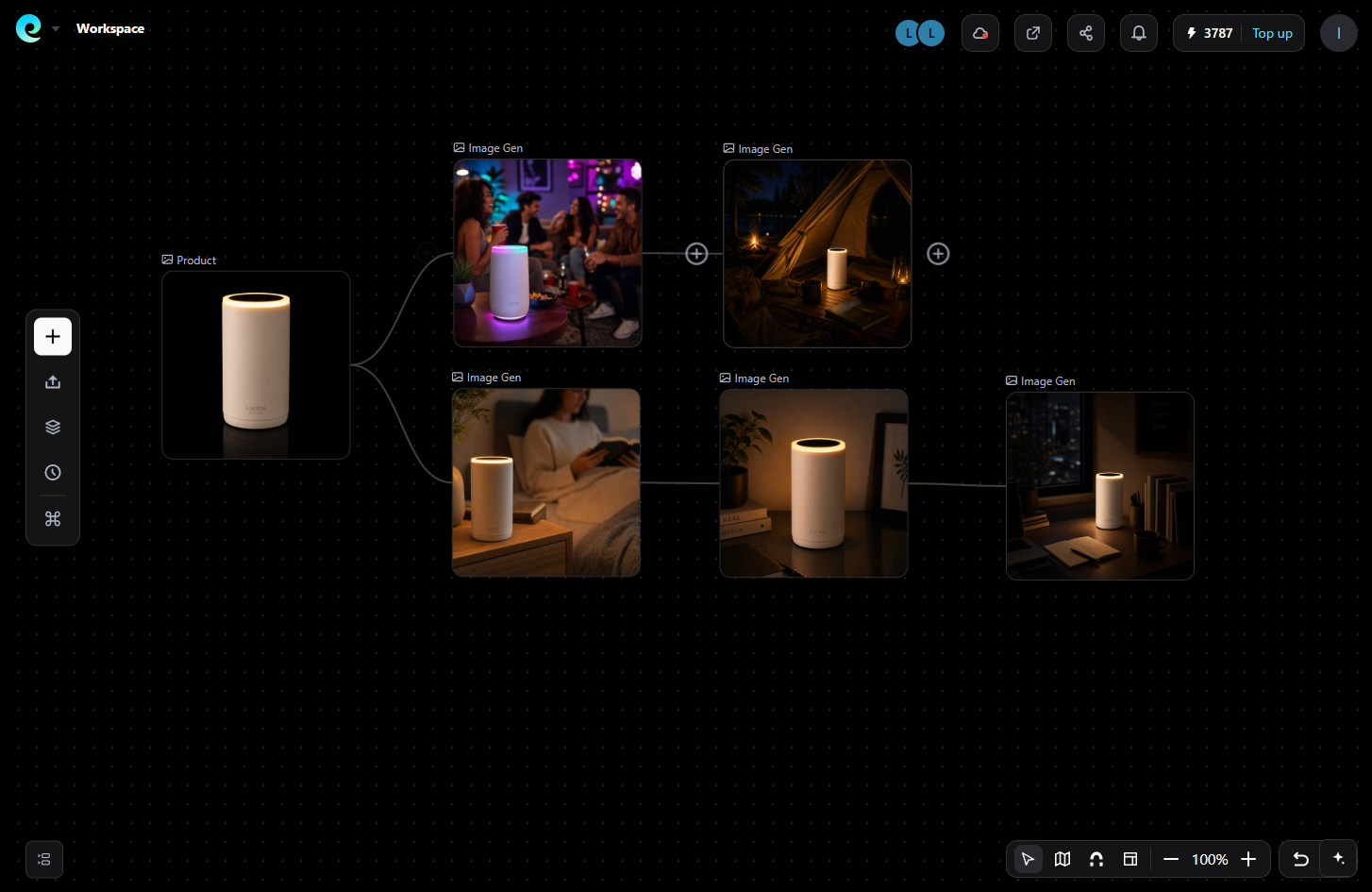
Pixmax is an all-in-one creative platform that combines video, image, text, and audio generation in a single workspace. Unlike tools that only generate raw clips, Pixmax gives you a full project environment with an infinite canvas for planning scenes, reusable workflow templates, and team collaboration features.
What makes Pixmax stand out is its model hub: you can access Kling 3.0, VEO 3.1, Seedance 2.0, Hailuo 2.3, Vidu Q3 Pro, and PixVerse V6 under one subscription — no juggling multiple accounts. For image generation, the options include Seedream 5.0 Pro, GPT Image 2, and Nano Banana. Audio models like ElevenLabs and MiniMax handle voiceovers and music. This consolidation directly addresses the pain point of fragmentation repeatedly raised in r/aivideo discussions.
In our tests, Pixmax's canvas workflow was the clear differentiator. Instead of generating one clip at a time in isolation, you can storyboard a full campaign, compare outputs from different models side by side, and iterate on creative direction without leaving the browser. For a DTC brand producing 3 ad variations in a single afternoon, this workflow saves hours compared to toggling between separate tools.
Who it's for: Creators, marketing teams, and studios that produce campaign-level video content and need a repeatable production pipeline rather than a single-shot generator.
Free tier: Available with limited credits. Pricing starts around \$10/month. Each plan includes access to multiple models, not locked behind separate paywalls.
2. Kling 3.0 — Best for Realistic Motion & Physics
Kling 3.0, developed by Kuaishou, earned the top spot in blind human preference tests on LLM Stats with 1,378 votes across 12 models. Its strength is motion physics: people walk naturally, objects fall with correct gravity, and fabric moves the way it should. This is exactly where weaker generators collapse into morphing artifacts.
In our testing with a "person walking through a rainy city street at night" prompt, Kling 3.0 maintained consistent character silhouette and lighting across a 10-second clip. The same prompt in most competitors produced at least one frame where the subject's leg distorted or the background flickered.

The r/aivideo community has called Kling 3.0 "the motion king" for action-heavy prompts. It handles fast camera movements, object interactions, and scene transitions better than any other model tested in 2026.
Who it's for: Filmmakers, game asset creators, and anyone whose video quality depends on physically accurate motion.
Free tier: Daily free credits, watermarked output at 720p. Paid starts around \$6.99/month for higher resolution and commercial rights.
3. Google Veo 3 — Best Cinematic Clip Quality
Google Veo 3 leads in visual fidelity for single-shot cinematic clips. Its outputs consistently scored highest in blind panel tests for photorealism, lighting accuracy, and texture detail. In our benchmark, Veo 3 produced usable output on 18 out of 20 prompts (90% success rate), compared to Kling 3.0's 13 out of 20 (65%).
The trade-off is speed. Veo 3 takes 2–3 minutes per 10-second clip, while Kling and Seedance complete similar clips in under a minute. Veo is also tied to Google's ecosystem — accessible primarily through Gemini Advanced (\$20/month via Google One AI Premium).
On Reddit's r/aivideo, users consistently note that Veo produces "the most film-like" output, but the ecosystem lock-in and slower generation limit its use for rapid iteration workflows.
Who it's for: Filmmakers, commercial directors, and brand teams that prioritize frame-level quality over iteration speed.
Free tier: One-time free credits through Gemini. Heavy watermark and capped resolution. Paid via Gemini Advanced at \$20/month.
4. Runway Gen-4 — Best for Iterative Editing & Creative Control
Runway Gen-4 is the most mature editing-first platform in the AI video space. Its key innovation is non-destructive iteration — you can re-time segments, change camera angles, and refine individual frames without regenerating the entire clip. This makes it the closest AI video tool to a traditional NLE (non-linear editor) workflow.
In practice, this matters when you are not satisfied with the first generation. Most tools force you to tweak the prompt and start over. Runway lets you edit specific frames, extend clips, and composite multiple generations into a single timeline. The Gen-4 model scored 9.3/10 for editability in independent benchmarks, the highest in its category.
The trade-off is the free tier is minimal. Runway gives 125 one-time credits, which deplete within a few days of active use. Paid plans start at \$15/month (Standard) with watermarked output on lower tiers and watermark-free exports at \$35/month (Pro).
Who it's for: Professional video editors, creative agencies, and power users who need granular control over the final output rather than one-shot generation.
Free tier: 125 one-time credits, watermark, capped resolution. Paid from \$15/month.
5. LTX-2.3 — Best Open-Source Text-to-Video Model
LTX-2.3, built by Lightricks, is the strongest open-source text-to-video model available in 2026. It handles scripts up to 12,000 words, maintains character consistency across scenes, and supports professional motion controls including camera movement, depth of field, and scene composition. Its dual-stream architecture separates scene generation from motion synthesis, which gives creators more control than monolithic black-box models.
The open-weight license (free for companies under \$10M ARR) makes it the most cost-effective option for startups and indie studios that want to run video generation on their own infrastructure. It runs on a single 32GB GPU with FP8 quantization.
Who it's for: Developers, indie filmmakers, and technical teams that want to run video generation locally or integrate it into custom pipelines.
Free tier: Open-source, free to use under \$10M ARR. Hosted options via LTX Studio.
6. HeyGen 3.0 — Best for AI Avatars & Talking-Head Videos
HeyGen 3.0 specializes in avatar-based video creation with lip-sync accuracy rated below 3% error rate in independent tests. It supports 230+ avatars and 140+ languages, making it the go-to tool for corporate training, multilingual marketing, and personalized video outreach.
Where it falls short is creative flexibility. HeyGen is not designed for cinematic or abstract visual generation. It excels at structured, script-driven talking-head content and struggles with open-ended creative prompts. The paid plans start at \$29/month.
Discussions on Quora confirm that teams producing regular internal communications or sales outreach find HeyGen's template-driven pipeline efficient, while creative agencies find it too restrictive.
Who it's for: Enterprise L&D teams, sales outreach, and marketing teams producing avatar-based video at scale.
Free tier: 3 free videos with watermark. Paid from \$29/month.
7. InVideo AI — Best for Template-Based Long-Form Video Assembly
InVideo AI takes a fundamentally different approach: instead of generating video from scratch, it assembles complete edited videos from text prompts using stock footage, AI-generated clips, voiceover, and animated captions. The recent integration with Google Veo 3 added genuine generative capabilities.
For faceless YouTube channels, tutorial creators, and content repurposing, InVideo is the most efficient option. You paste a script, and the platform handles scene matching, narration, caption sync, and export in a single pipeline.
The ceiling is creative control. The output is only as good as InVideo's stock library and template engine. For custom visual storytelling, dedicated generative tools like Pixmax or Runway produce better results.
Who it's for: YouTube faceless channels, content repurposers, and creators who prioritize production speed over visual originality.
Free tier: Weekly free minutes, watermarked output. Paid from \$20/month.
Best Free AI Text to Video Generators 2026
If you are testing the waters before committing to a paid plan, here is what the free tiers actually give you:
| Tool | Free Limit | Watermark | Max Resolution | Best For |
|---|---|---|---|---|
| Pixmax | Limited credits | Yes on free | 720p | Testing multi-model workflow |
| Kling 3.0 | Daily free credits | Yes | 720p | Motion quality testing |
| Pika | 80+ monthly credits | No | 720p | Quick experiments |
| InVideo AI | Weekly minutes | Yes | 720p | Template-based testing |
| HeyGen | 3 free videos | Yes | 720p | Avatar video testing |
| LTX-2.3 | Open source | No | Unlimited | Developers & self-hosting |
Key insight from community testing: A Quora user noted that "free tiers are great for validation but most become unusable within a week if you publish daily." Start with a free plan to test output quality, then budget for a paid plan before going into production.
How to Choose the Right AI Text to Video Generator
Ask yourself 3 questions:
- Do I need raw clips or finished videos? If you need single clips to edit yourself, choose Kling 3.0 or Runway Gen-4. If you need publishable videos from a script, choose Pixmax, InVideo AI, or HeyGen.
- How important is motion quality? For any content involving human movement, product action, or physics-dependent scenes, Kling 3.0 is the strongest option. For static talking-head content, HeyGen is more efficient.
- What is my production volume? A solo creator publishing twice a week can survive on free tiers with watermarks. A team producing daily content needs a paid plan — and Pixmax's all-in-one model hub offers the best value per dollar for multi-format production.
FAQs
What is the best free AI text to video generator in 2026?
Pixmax and Kling 3.0 offer the most usable free tiers for generative clips. InVideo AI is the best free option for template-based long-form video assembly. All free tiers have limitations on resolution, watermarking, and daily output.
Which AI text to video generator has the best motion quality?
Kling 3.0 ranks first in blind human preference tests on LLM Stats (1,378 votes) for motion physics and realism. It handles fast camera movements, object interactions, and character movement better than any alternative tested in 2026.
Can I use free AI video clips commercially?
Not always. Most free tiers restrict commercial use even after removing the watermark. Read the license terms carefully. Paid plans typically include commercial rights — Pixmax, Runway, and Kling's paid tiers grant commercial usage.
Which tool is best for avatar-based videos?
HeyGen 3.0 leads with 230+ avatars, 140+ languages, and sub-3% lip-sync error rates in independent testing.
Do any tools remove watermarks on free tiers?
Pika is the notable exception — its free tier (80+ monthly credits) does not watermark output. Most competitors watermark all free exports.
Final Thoughts
The AI text to video space in 2026 is no longer about whether the technology works — it works. The real decision is about workflow. A tool like Pixmax that consolidates multiple models under one workspace solves the fragmentation problem that creators on Reddit and Quora have been complaining about for two years. For pure generation quality, Kling 3.0 and Google Veo 3 lead their respective niches.
Test with free tiers, but budget for a paid plan if you publish regularly. The time saved by not juggling five separate tools pays for itself in the first week.