Limited-time deal: WAN 3.0 Video Generation had an 80% off Pixmax promotion through August 27, 2026, 12:00 PM ET. For the latest Pixmax offers, visit the Pixmax offers page.
Wan 3.0 is also attractive for NSFW-style, mature, or age-gated creative testing because its realism, motion continuity, and prompt control can make generated scenes feel unusually lifelike with fewer creative constraints than older video models. Use that flexibility responsibly: creators must follow applicable laws, consent standards, copyright rules, and platform policies, and user-generated prompts or outputs remain the responsibility of the individual creator rather than Pixmax.
Quick Answer: Is Wan 3.0 worth it?
Wan 3.0 is Alibaba's next-generation AI video model, in public beta since August 6, 2026. It generates up to 30-second clips from text, image, video, audio — and, uniquely, from documents and web pages — and pairs that with native audio, multi-shot narrative control, and in-model video editing. Yes, it is worth testing, especially if you need long one-take clips, document-to-video, or edit-style workflows.
But set expectations before you pay: it is a closed, API-only model with no free tier, official output tops out at 1080p (some platforms sell "4K" as a platform feature), and it has no independent benchmark results yet.
For repeatable, schedule-driven content at a fair price, Wan 3.0 is one of the strongest options in 2026; if you only care about raw visual quality, blind human comparisons still rank Gemini Omni Flash and MiniMax H3 above the whole Wan line.
What Is Wan 3.0?
Wan 3.0 is the 2026 flagship of Alibaba's Wan video generation family, first launched in July 2023 by Alibaba's Tongyi Lab. Open weights ended at Wan 2.2 (Apache 2.0); generations 2.5 through 2.7 and 3.0 are commercial, cloud-only API models. The new push: long single-take generation, omni-modal input including files and web pages, and editing-style control over the generated result.
What's Actually New in Wan 3.0
Wan 3.0's headline upgrade is 30-second single-shot generation — double the 15-second ceiling of Wan 2.7-Video — combined with multimodal inputs that include documents and web pages.
- 30-second one-takes: enough time for complex camera moves and continuous unbroken shots without stitching clips in post.
- Document-to-video (industry first): accepts PDF, Word, Excel, PowerPoint files and even URLs, and turns their content into video.
- Omni-modal reference: image, video and audio references guide character appearance, props, spatial layout, style and sound; first-frame/last-frame control is supported.
- Character and scene consistency: designed to resist the visual drift and distortion common in AI video, with realistic faces and synchronized micro-expressions.
- Synchronized audio in the same pass: dialogue, ambience and music are generated with the visuals, including multilingual voice output.
- Intelligent duration + video extension: the model recommends optimal clip length from your prompt and can extend an existing timeline while keeping its established style and composition.
Key specs at a glance
| Spec | Value |
|---|---|
| Model ID | wan3.0-video (Qwen Cloud / DashScope) |
| Max duration | ~30 seconds |
| Inputs | Text, image, video, audio, documents, web pages |
| Capabilities | Reference, editing, replication, driving |
| Output resolution (official API) | Up to 1080p |
| Availability | Public beta, API only, closed weights |
| Concurrency | 2 concurrent requests / 50-task queue / 30 RPM |
Who Should Use Wan 3.0 — and How to Prompt It in Pixmax
Wan 3.0 is best suited to film and short-form production, advertising, creative design, and tourism content, with both vertical and horizontal formats supported. For the easiest setup, use Wan 3.0 in Pixmax; choose another model if you need studio-grade dialogue, perfectly rendered in-frame text, self-hosting, or maximum photorealism.
Simple prompts
`Subject + Scene + Motion` — e.g., "A woman in a red coat walks through a rainy city street at night."
Cinematic prompts
Add setting details, motion direction, aesthetic control, stylization, and sound. Useful details per the official doc: subject appearance, clothing, expression and position; environment, lighting, weather, and time of day; movement, speed, direction and interaction; camera angle, framing, lens and camera movement; visual style, color palette, texture and atmosphere; dialogue, voice characteristics, sound effects and music.
Specialized prompt formats (per official docs)
| Mode | Prompting focus |
|---|---|
| Image-to-video | Focus on motion and camera movement — the source image already defines subject and setting |
| Sound generation | Describe voice, emotion, speaking rate, ambient sounds, effects, and background music |
| Reference-to-video | Tag each reference and state how every image/video/audio clip should be used |
| Multi-shot video | Give the overall narrative, shot numbers, timestamps, and separate descriptions per shot |
| Video editing | Specify the editing target and action — add an object, replace a character, change lighting, extend a scene, modify dialogue |
Additional controls the model accepts: single shot or several shots; one continuous take; include or exclude dialogue; include or exclude background music; preserve selected parts of an existing video while modifying others; extend a video while maintaining its established style and composition.
In Pixmax, select Wan 3.0 and use the official prompt structure: `Subject + Setting + Motion + Camera + Style + Sound`. Keep one clear action per shot; for image-to-video, focus on motion and camera movement instead of redescribing the image. Generate a short test first, then refine only the part that missed your intent.
How Much Does Wan 3.0 Cost?
Wan 3.0 is a metered, paid model with no free tier — expect roughly $0.05–$0.20 per second of video depending on resolution, or about $6 for a 30-second 1080p clip.
| Resolution | API price per second | 30s clip cost |
|---|---|---|
| 480p | $0.05 | ≈ $1.50 |
| 720p | $0.10 | ≈ $3.00 |
| 1080p | $0.20 | ≈ $6.00 |
That is roughly a third more than Wan 2.7 per second, with no independent quality benchmark published yet to justify the premium. Third-party platforms set their own credit pricing, so always compare per-minute effective cost before committing.
How to Try Wan 3.0 Easily?
Pixmax is an all-in-one AI creative platform for planning, generating, comparing, and exporting video content in one workspace. Instead of testing models in separate tools, creators can manage prompts, references, scenes, outputs, and team workflows together.
Wan 3.0 on Pixmax gives you direct access to the model in a no-code workflow, with text-to-video, image-to-video, duration and camera controls, synchronized audio, multi-shot generation, and platform-level export options. It is the fastest path if you want to test Wan 3.0 without setting up Alibaba Cloud or building around the API first.
How to use Wan 3.0 on Pixmax
- Click the + button to add a Video node to the canvas.
- Enter the script for the video you want to generate. If you do not have a finished script yet, you can use a Text node on the same canvas to turn your idea into a detailed, vivid prompt.
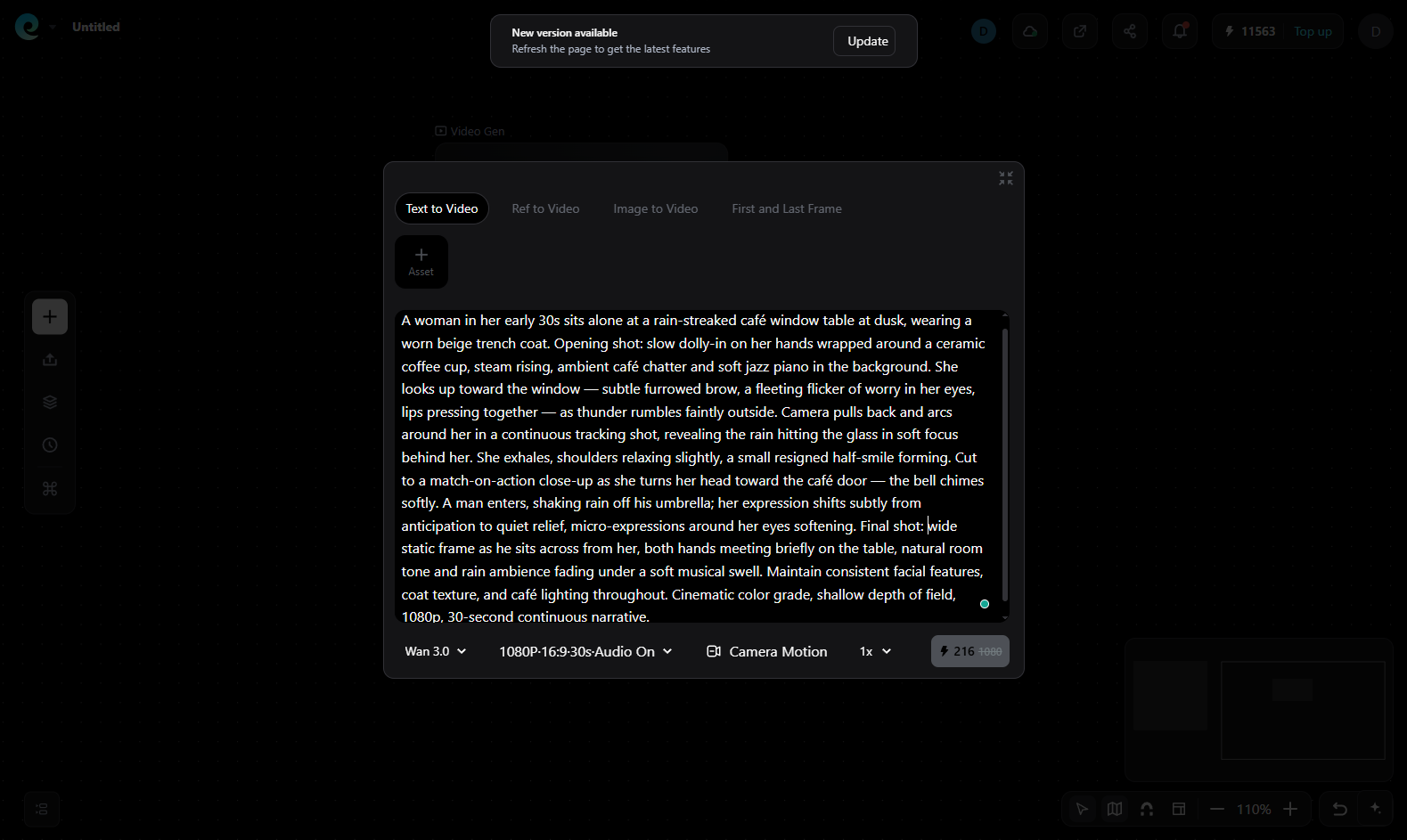
- Select the Wan 3.0 AI video model on Pixmax. You can also set the resolution, aspect ratio, audio, video duration, and other details. In this example, I use 1080p, a 16:9 aspect ratio, a 30-second duration, and auto-generated audio.
- Click the white credit-cost button to start generation. Wait a moment, and the video preview will appear on the canvas.
From this sample, Wan 3.0 looks strong on subject consistency, camera stability, and overall cinematic polish. The motion stays smooth and the scene holds together well, while the main limitation is still the familiar one for AI video: some fine detail softens a bit, so it feels strong for realistic clips, not flawless frame-by-frame precision.
Pixmax is also useful beyond Wan 3.0 because you can compare leading models in the same project, including Seedance 2.5, Kling 3.0, Veo 3.1, and Wan 2.7. For script-driven production, the AI Video Agent can turn prompts into a fuller pipeline with script analysis, storyboarding, generation, and batch refinement while keeping characters and scenes consistent across outputs.
What Hands-On Testers and the Community Actually Say
Hands-on reports praise Wan 3.0's character consistency, motion weighting, camera control and ambient audio. The recurring weaknesses are processed dialogue, inaccurate in-frame text, soft hands or crowds, and occasional discontinuity between shots.
- A hands-on review by video-generator.ai found object permanence dramatically improved: a character's jacket stayed the same color across a 12-second crowded-market scene, and camera commands like orbit, push-in and follow behave "more like a parameter than a wish." The same reviewer notes ambient audio (footsteps, wind, crowd murmur) is good enough for rough cuts, but spoken dialogue still sounds processed — keep real voice work for client-facing projects.
- On Reddit's r/WanAI, the announcement thread focuses on the native 30-second 1080p-with-audio capability, with users pressing for real output samples rather than demo reels. Elsewhere on r/StableDiffusion, some users complain recent Wan generations feel "like CGI, 3D, 2D and animations" — a sentiment worth noting if photoreal naturalism is your benchmark.
The pattern across all sources is consistent: the foundation is strong and production-usable today, but the "wow" factors (perfect audio, 4K reliability, flawless crowd scenes) are marketing copy, not shipping reality.
What Most "Reviews" Get Wrong
The three most repeated claims about Wan 3.0 — native 4K output, open weights, and independent benchmark leadership — are all unsupported by first-party sources; the verified picture is 1080p max, fully closed, and completely unbenchmarked.
- "4K" is not on Alibaba's menu. The first-party listing prices 480p/720p/1080p tiers only. If a platform advertises Wan 3.0 "4K," that is a platform-level feature (rendering or enhancement), not the model's native spec — verify before you pay a premium. For example, Pixmax's Wan 3.0 page lists up to 3840×2160 4K UHD output as a platform capability.
- Weights are closed. "Free download" sites are not Wan 3.0. The last open-weights release in the line remains Wan 2.2 (Apache 2.0).
- There are zero independent benchmarks. Wan 3.0 does not appear on the Artificial Analysis Video Arena, the main blind-comparison leaderboard. Its predecessor Wan 2.7 sits 4th (Elo 1161, early August 2026) behind Gemini Omni Flash, MiniMax H3 and Seedance 2.0 — a strong mid-tier position, not a category win.
A source-verified breakdown by kingy.ai cross-checked every claim against Alibaba's own Qwen Cloud listing, Model Studio docs and the official Wan GitHub/Hugging Face organizations. When a review site claims features Alibaba hasn't published, check the vendor's own model listing first — that habit will save you money on this launch and every one after it.
Final Verdict
Wan 3.0 is worth testing for long, consistent AI video, document-to-video and editing workflows. Its strengths are 30-second clips, reference control, synchronized audio and competitive 1080p pricing; its limits are closed access, no free tier, weak in-frame text and no independent benchmark result. Pixmax is a practical starting point because it lets you generate and compare models in one workspace. Thanks for reading — and happy generating.
FAQ
Is Wan 3.0 free?
No. Wan 3.0 has no official free tier and costs about $0.05–$0.20 per second.
Can I download Wan 3.0? Is it open source?
No. Wan 3.0 is cloud-only; Wan 2.2 remains the latest open-weights release.
Does Wan 3.0 really generate 4K video?
Not natively. Alibaba's API tops out at 1080p; Pixmax may provide 4K as a platform-level feature.
How much does a Wan 3.0 video cost?
Roughly $0.05/s at 480p, $0.10/s at 720p and $0.20/s at 1080p — about $6 for a 30-second 1080p clip.
How do I write a good Wan 3.0 prompt?
Start with `Subject + Scene + Motion`; add camera, style and sound for more control.
Can Wan 3.0 edit existing video?
Yes. It can replace or restyle elements, change lighting and extend scenes.
Wan 3.0 vs Seedance 2.5: which is better?
Choose Wan 3.0 for document-to-video and editing; choose Seedance 2.5 for reference-heavy workflows.
Does Wan 3.0 generate audio?
Yes — synchronized dialogue, sound effects, ambient audio and background music are generated in the same pass as the video, including multilingual voice.
Can I use Wan 3.0 videos commercially?
Yes on applicable plans, but verify the platform's current commercial-use and ownership terms.
How do I get access to Wan 3.0?
Use Alibaba Cloud/Qwen Cloud, or open Wan 3.0 in Pixmax's ready-to-use console.