MiniMax H3 is MiniMax's general-purpose multimodal AI video generation model. It accepts text, images, video clips, and audio as one unified input and outputs video with native dual-channel audio, so creators do not need a separate audio generation or alignment step. You can now try the new MiniMax H3 AI video model directly inside Pixmax without a separate MiniMax account or API key.
What is MiniMax H3 and How Does It Work?
MiniMax H3 breaks away from the traditional approach, in which text-to-video, image-to-video, and video editing are split into separate modules. Instead, it treats a sentence, a reference image, a video clip, and an audio track as a single shared multimodal context, reads them together, and generates coherent output with built-in audio.
MiniMax describes H3 as a step toward "more general multimodal intelligence". The breakthrough is not only resolution or duration, but how deeply the model understands creative intent across different source materials.
MiniMax H3 Specifications: 5-15s Video, References, and Audio
| Spec | Detail |
|---|---|
| Output duration | 5-15 seconds |
| Resolution | 768p (upgradable to 1440p) or native 1440p |
| Frame rate | 24 FPS |
| Audio | Native dual-channel audio on every output |
| Aspect ratio | First/last-frame follows input image; text-to-video and omni modes support 21:9 to 9:16 with auto mode |
| Reference inputs | Up to 9 images + 3 video clips (15s or less each) + 3 audio clips, with 12 files max per task |
| Prompt length | Up to 7,000 characters |
Pixmax has integrated MiniMax H3 into the Infinite Canvas, removing the need for complex local deployment or code debugging. Creators can call H3 alongside other video, image, audio, and editing tools in the same production workspace.
For teams producing e-commerce assets, brand ads, or short-drama content, the native audio and multi-file reference support can reduce the friction of switching between separate video, editing, and audio tools.
Core Capabilities: Multimodal Inputs & Scene Consistency
1. Multimodal Understanding for Text, Image, Video, and Audio
MiniMax H3 processes text, images, audio, and video simultaneously, reading people, actions, sounds, emotions, camera language, and style across all inputs before producing one cohesive output. A reference image, a reference voice, and a reference camera move no longer require three separate steps; one request can carry the direction.
2. Precise Scene Editing and Creative Control
MiniMax H3 supports fine-grained edits to people, objects, scenes, sound, and pacing with strong instruction following. Creators can swap backgrounds, modify dialogue, adjust lighting, or add effects while the rest of the frame stays stable, which can shorten revision cycles for campaign and storyboard work.
3. Consistent Output for Production Workflows
MiniMax H3 is built for practical production pipelines across film, advertising, branding, e-commerce, and gaming. It handles on-screen text, subtitles, brand messaging, product showcases, and UI/UX motion demos, so it can support concept testing, storyboard previews, and pitch decks rather than only one-off demo clips.
Why MiniMax H3 Matters for AI Video Generation
Most competition among AI video models has focused on specs such as longer duration, higher resolution, or smoother motion. MiniMax H3 takes a different path: it prioritizes understanding how different modalities relate to each other, what a creator means by an edit, and how visuals and sound should work together.
That is why MiniMax H3 use cases span film trailers, fashion brand films, AI-driven short dramas, game UI demos, and product showcase videos. It is not solving one narrow task; it is addressing the broader problem of turning creative intent into finished audiovisual content accurately.
MiniMax H3 vs. Other Video Models (Seedance 2.5 / Kling 3.0)
MiniMax H3, Seedance 2.5, and Kling 3.0 all serve serious AI video workflows, but they are not interchangeable. The best choice depends on whether your project needs multimodal reference control, longer connected clips, or motion realism.
| Model | Best fit | Key difference |
|---|---|---|
| MiniMax H3 | Multimodal reference-led generation and targeted scene editing | Combines text, images, video, and audio references in one controlled workflow |
| Seedance 2.5 | Longer narrative or reference-heavy video sequences | Useful when clip length and multi-reference continuity are the main priority |
| Kling 3.0 | Realistic motion, action, camera movement, and physical interaction | Often selected when movement quality matters more than mixed audio/video reference control |
For real production, many teams compare multiple models instead of forcing one model to solve every shot. If you need longer reference-heavy scenes, read our Seedance 2.5 review; if motion transfer and camera movement are your priority, the Kling Motion Control guide is a useful next read. Pixmax makes this comparison easier because MiniMax H3, Seedance, Kling, and other models can live in the same canvas workflow.
How to Try MiniMax H3 on Pixmax
Pixmax is a full-pipeline AI video workflow platform that aggregates leading models including Seedance, Kling, Hailuo, Wan, and MiniMax H3. H3 strengthens the platform's multimodal video generation lineup by adding native audio, mixed references, and more controllable scene editing.
Why use MiniMax H3 on Pixmax:
- Zero friction: No need to register for a MiniMax account or apply for an API key. Your Pixmax account works immediately.
- Built into your workflow: Call H3 directly inside Pixmax's AI Video Agent and Project Workspace, then combine it with other models in one pipeline.
- Multi-model comparison: Test H3 against Seedance, Kling, Wan, and other video models without moving assets between separate tools.
- Free credits: New users can use free trial credits to test H3 video generation right away.
Try MiniMax H3 for Free on Pixmax
How to Create Character-Consistent AI Videos with MiniMax H3
This workflow demonstrates how to maintain 100% character consistency across video scenes using Pixmax and MiniMax H3.
Instead of generating random videos where the subject changes every frame, first lock in a fixed character visual asset, expand it into a 9-angle reference set, and feed those multi-reference images into MiniMax H3 to drive controllable, high-fidelity video generation.
Step 1: Generate the Base Character Asset
Start by creating your main character image using your preferred AI image generator, such as Midjourney V8.2, GPT Image 2, or Nano Banana Lite.
- Objective: Create a clear, high-quality anchor image of your subject.
- Prompt Example: Define the character, wardrobe, pose, background, and visual style as clearly as possible.
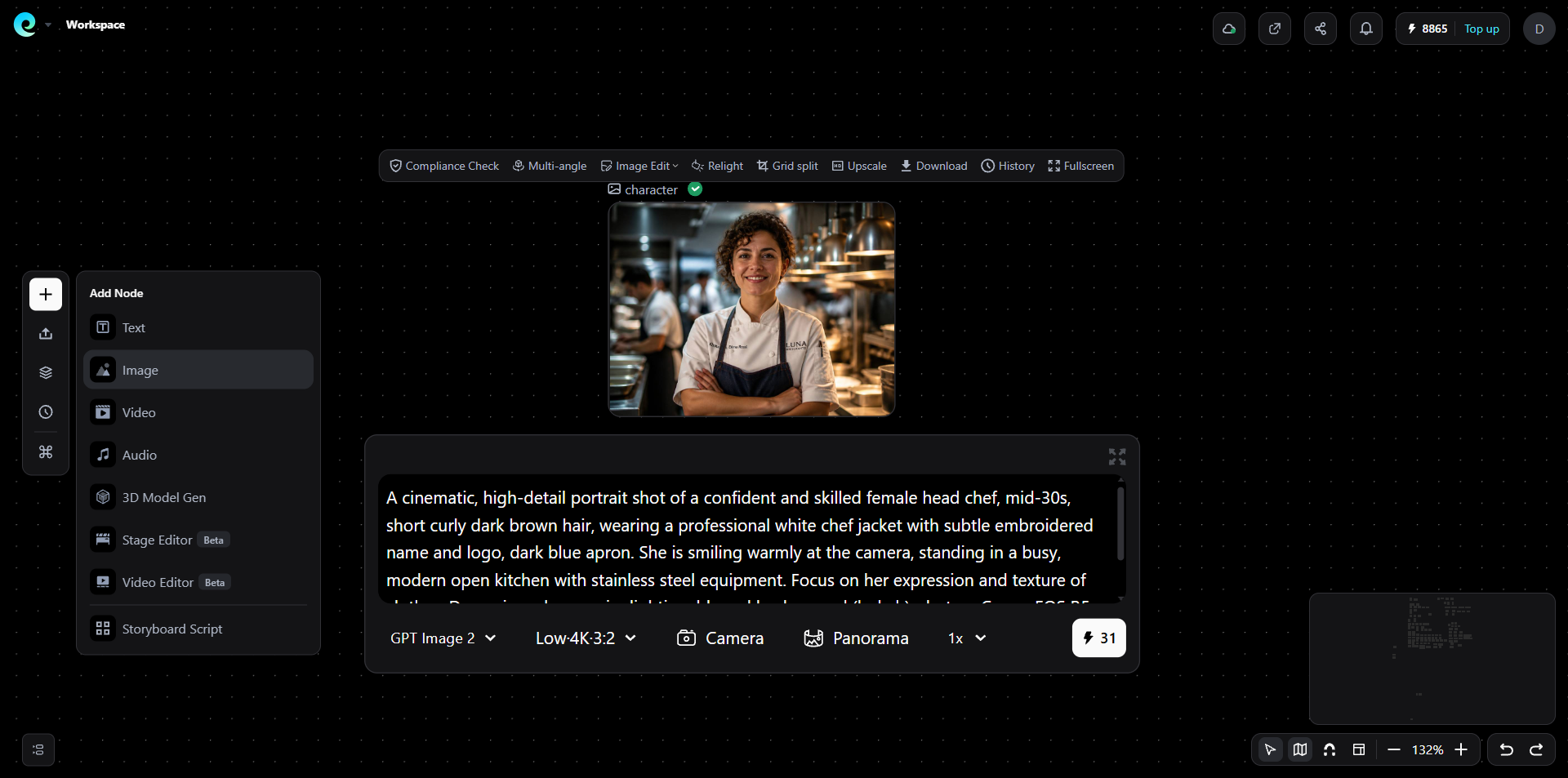
Step 2: Expand to a 9-Angle Character Reference Set
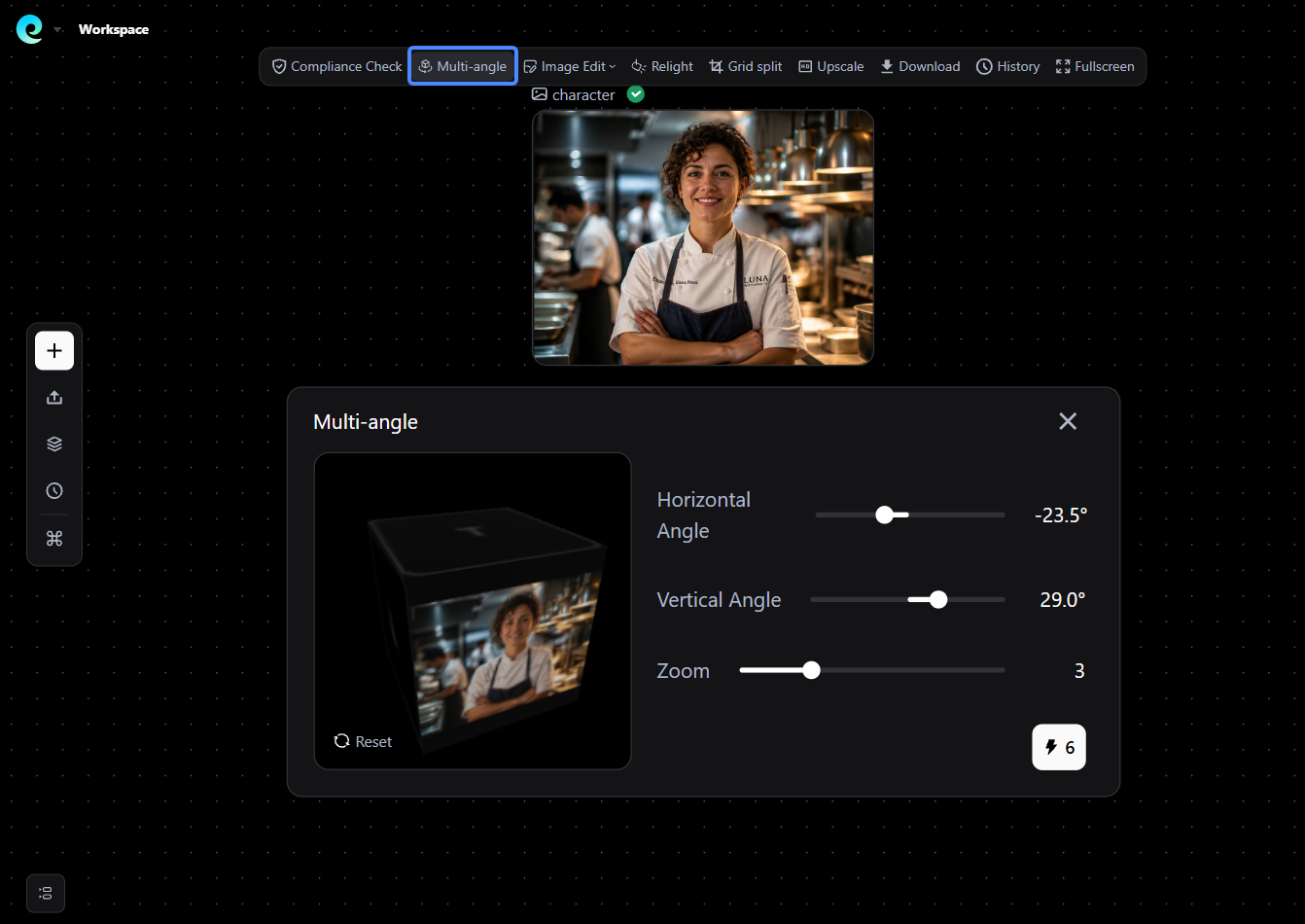
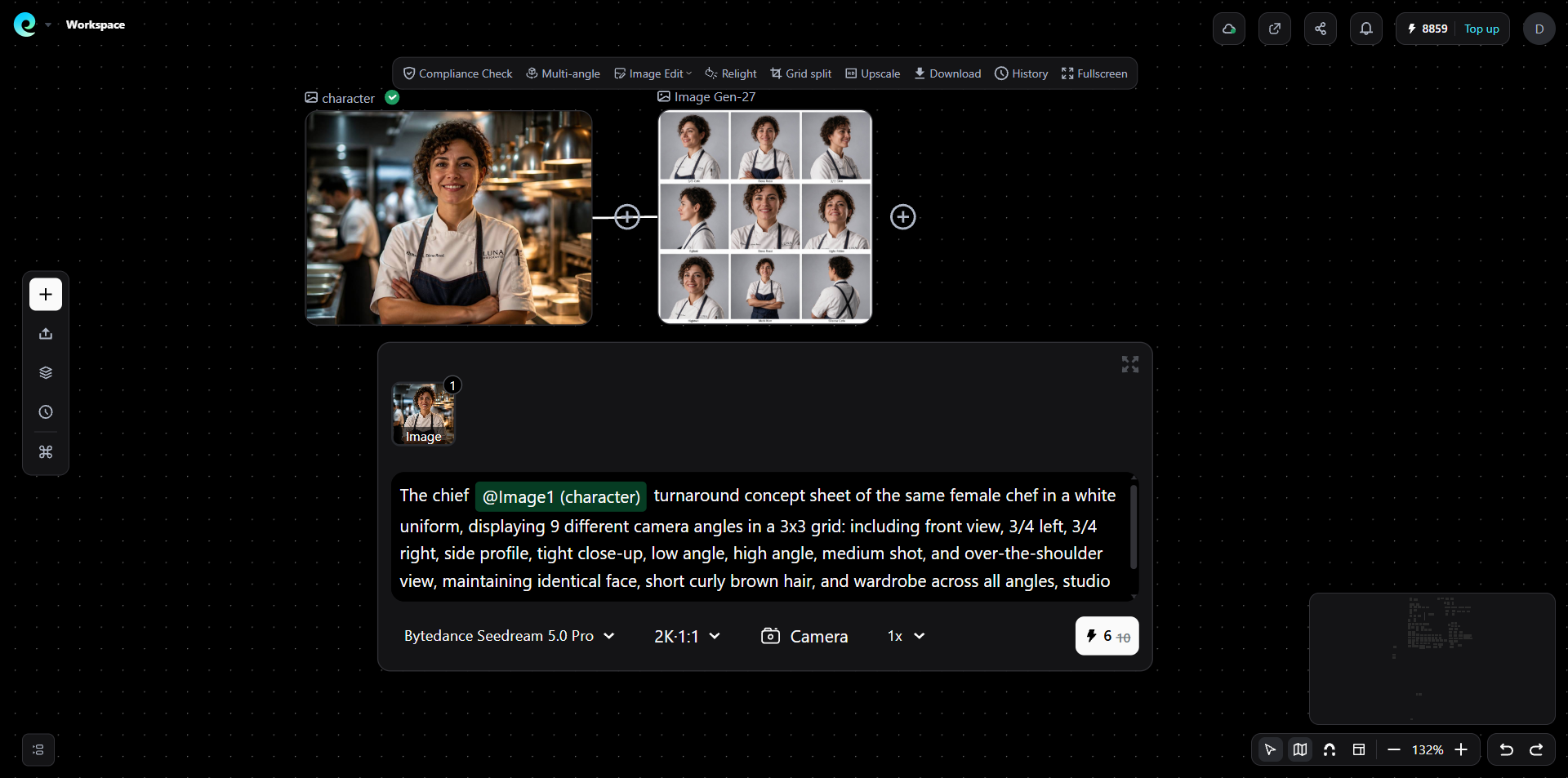
To ensure MiniMax H3 captures your character from every perspective, generate 9 image variations showing different angles and poses while preserving identity.
- Option A (Recommended): Use Pixmax's built-in Multiple Angle feature to automatically output a batch of consistent multi-view character shots (front, 3/4 profile, side, close-up, full shot).
- Option B (Custom Node Graph): Use Pixmax Image-to-Image (Img2Img) workflow by adding reference nodes with specific angle prompts (e.g., "same female chef, close-up shot, looking left").
Step 3: Direct the Final Scene with MiniMax H3
Now bring your 9 reference images into MiniMax H3 to generate your final scene without losing character identity.
Select MiniMax H3 as the ideal video model. Batch-reference all 9 character variation images into the [Image References] panel to lock facial structure, hairstyle, and wardrobe. Then enter your motion and scene prompt in the text bar.
- Final Motion Prompt Example:
"A cinematic 15-second sequence featuring the female chef defined in the reference images (character & Image Gen-27 grid). Camera slowly tracks backwards from a eye-level medium close-up as she beams a confident smile at the lens, showing her white chef jacket and dark apron with exact detail. As the camera pans, she seamlessly transitions into motion, turning around to wipe a reflective marble counter with a clean white cloth. Shallow depth of field, warm indoor kitchen bokeh, subtle heat waves rising behind her, high dynamic range, photorealistic."
Conclusion: Try the MiniMax H3 AI Video Model on Pixmax
MiniMax H3 is most useful when a video project depends on reference control, native audio, scene consistency, and targeted editing rather than a single isolated prompt. If your team creates ads, product visuals, short-drama shots, storyboards, or game cinematics, the MiniMax H3 AI video generator on Pixmax gives you a practical way to test the model inside a broader production workflow. Thanks for reading.
MiniMax H3 FAQ
Is MiniMax H3 free to try on Pixmax?
Yes. New Pixmax users can use free trial credits to test MiniMax H3 directly in the Pixmax workspace without a separate MiniMax account or API key.
What reference files does MiniMax H3 support?
MiniMax H3 supports text prompts plus image, video, and audio references. A mixed-reference task can include up to 12 files, including up to 9 images, 3 video clips, and 3 audio clips.
How long are MiniMax H3 generated videos?
MiniMax H3 generates 5-15 second video clips with native audio, making it useful for short scenes, product videos, ads, and social-ready creative tests.
How is MiniMax H3 different from Seedance 2.5 and Kling 3.0?
MiniMax H3 focuses on multimodal reference control and scene editing with text, image, video, and audio inputs. Seedance 2.5 is strong for longer reference-heavy clips, while Kling 3.0 is often chosen for realistic motion and physics.