




Quick answer:
Qwen Image 3.0 is Alibaba's third-generation image foundation model — released July 2026 — built to turn ultra-long prompts (up to 4,500 tokens) into dense, text-perfect visuals: newspapers, infographics, storyboards, exam papers, and real-time-style UI.
Official specs: ~10px legible text, native rendering in 12 languages, and instruction-based editing of up to three reference images. You can run it on Qwen Chat, Alibaba Cloud, fal.ai, Replicate, or ComfyUI — and it's now live on Pixmax. The one real bottleneck is your prompt: short, Qwen Image 2.0-era prompts quietly produce 2.0-quality results.
What Is Qwen Image 3.0?
Qwen Image 3.0 is Alibaba's third-generation image generation and editing model, and its launch is framed around a single word — "Real." That means the model optimizes for useful output, not just good-looking pictures: correct text, correct layout, and dense information packed into one image in a single pass.
The practical shift is that you stop prompting a scene and start briefing a document. Give it a newspaper, a 3×3 infographic grid, or a labeled science diagram, and Qwen Image 3.0 composes the entire thing at once — no stitching, no model chaining.
What the Headline Specs Actually Mean
- Rich Content — prompts up to 4,500 tokens. Roughly 4.5× the previous generation's budget, so you can specify panel structure, exact text strings, and layout rules in one request.
- Authentic Details — ~10px legible text. Small print, formulas, and captions stay readable, alongside micro detail like pores, hair strands, and paper grain.
- Deep Knowledge — 12 languages, 20+ fonts. Native text rendering plus world knowledge for simulating web, app, game, and livestream interfaces.
One honest caveat: these are vendor claims. At launch, independent third-party benchmarks were still thin, so treat the numbers as the design ceiling — real output depends heavily on how you prompt. The official Qwen Image 3.0 announcement demonstrates each spec with its own showcase images.
Qwen Image 3.0 vs Qwen Image 2.0: What Changed
| Capability | Qwen Image 2.0 | Qwen Image 3.0 |
|---|---|---|
| Instruction budget | ~1,000 tokens | ~4,500 tokens |
| Minimum legible text | larger sizes | ~10px |
| Native languages | English/Chinese focus | 12 languages |
| One-pass dense layouts | posters, slides | newspapers, exam papers, multi-panel grids |
| Image editing | single image | 1–3 reference images, structure preserved |
| Max output | 2K | 2048 × 2048 (2K) |
The token budget is the real upgrade. Existing Qwen Image 2.0 prompt libraries are structurally underpowered here — which is the most common reason a first Qwen Image 3.0 render "looks the same."
How Much Does Qwen Image 3.0 Cost?
Pricing is per-image across providers and varies more than most people expect:
| Provider | Approximate price | Notes |
|---|---|---|
| Alibaba Cloud Model Studio | ~$0.025–$0.03 / image | 1K and 2K output share the same rate |
| fal.ai | $0.075 / image | Generation and editing, same rate |
| Replicate | $0.03–$0.04 / image | Standard vs Pro model |
Prices checked September 2026 and subject to change. For batch production — posters, product shots, UI screens — the gap between $0.03 and $0.075 per image compounds quickly, so review the rate on your chosen platform before committing a pipeline.
Where to Run Qwen Image 3.0
No GPU or installation required — the model is available through hosted paths today:
- Qwen Chat — the fastest way to test the model itself.
- Alibaba Cloud Model Studio — API access to `qwen-image-3.0` and `qwen-image-3.0-pro`; editing accepts 1–3 reference images (JPG, PNG, WebP, etc., up to 10 MB). See the Qwen Image 3.0 API documentation.
- Run Qwen Image 3.0 on Pixmax (One-Click, Production-Ready)
Qwen Image 3.0 is now live on Pixmax. If you build ads, storyboards, or campaign assets — and already want video, image, text, and audio models in one workspace — Pixmax lets you run Qwen Image 3.0 without juggling separate APIs, then push the output straight into production alongside models like Seedance 2.5 and Wan.
How to Prompt Qwen Image 3.0: 4 Rules That Matter
Qwen Image 3.0 is not a short-prompt model. Its advantages only show when the prompt reads like a design brief.
- Name every text string in quotes. "Add a subtitle" produces glyph soup. `Subtitle reads exactly: "Chapter Two — The Descent"` produces the real string. If you don't dictate the copy, the model improvises — and AI-improvised copy is still the most reliable failure point.
- Set the canvas first. Lock dimensions and aspect ratio in the first line. Negotiating composition mid-prompt ends in cropped layouts.
- Spend the budget on constraints, not adjectives. Use the 4,500 tokens for column counts, panel order, margins, and color rules. Adjectives top out fast; structure pays.
- Verify at final size. Text that looks crisp at 1K can garble at production scale. Render at your target resolution and inspect before shipping.
A quick failure test worth knowing: the community has documented garbled non-English text in the Qwen Image family before, so check any non-Latin strings on the actual output, not on the preview.
Putting Qwen Image 3.0 to the Test on Pixmax
We didn't judge Qwen Image 3.0 on pretty pictures. Vendors already give you those. Instead, we ran a production-style stress test inside Pixmax — where Qwen Image 3.0 is live — and graded it on the one thing that actually matters: can it execute a dense, multilingual design brief in a single pass?
The Test Prompt
This is the exact brief we used. It follows all four prompt rules above — canvas locked first, every text string in quotes, constraints instead of adjectives:
LAYOUT: A4-style educational infographic, portrait 1080×1440, clean modern grid with generous white space.
HEADER (top, bold navy serif): "The Lifecycle of AI Content Creation"
SUBTITLE (under header, gray sans-serif): "Six stages from prompt to production"
THREE-COLUMN BODY: Column 1 has a vertical flow diagram with 4 numbered boxes, each with 8-10 word captions; Column 2 is a "Key Numbers" panel with 5 stat rows, each row showing a large bold number, a small label, and a one-line note; Column 3 is a "Do / Don't" checklist in two stacked boxes, with 3 green checkmark items above 3 red cross items, item text 6-10 words each.
FOOTER band across bottom: three small language labels stacked vertically — left reads exactly "Chinese product brief", center reads exactly "Japanese user guide", right reads exactly "Korean user guide" — each on a soft-tinted rounded chip.
Apply subtle paper texture to the whole sheet; keep all text left-aligned, no shadows, no watermark.
The brief is deliberately hostile to weak models: verbatim copy in quotes (no room to improvise), three non-Latin scripts (Chinese/Japanese/Korean — historically the family's weak spot), and strict count constraints (4 boxes, 5 stat rows, 3+3 checklist items) that make layout collapse easy to detect.
How to Use Qwen Image 3.0 to Generate an Educational Infographic
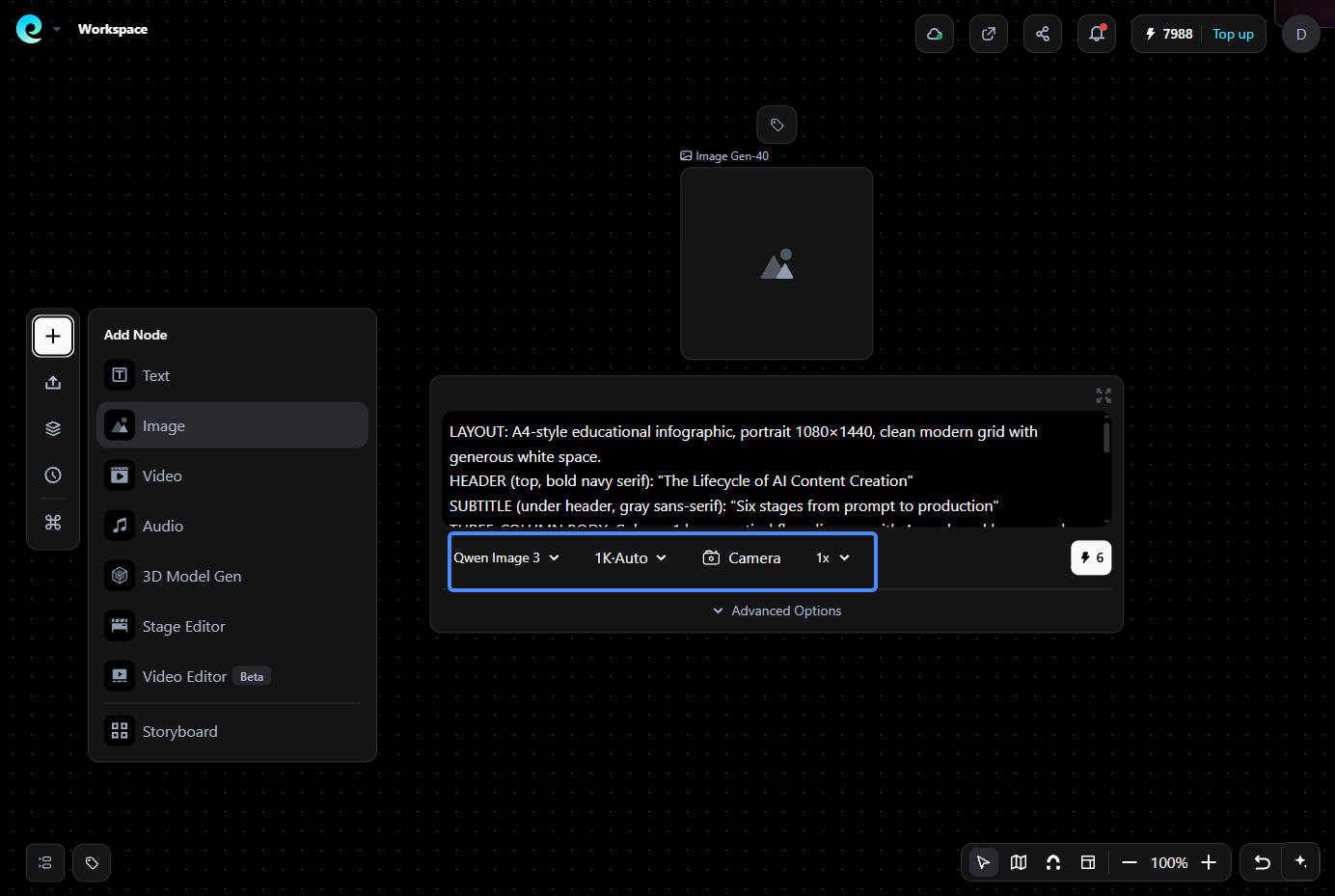
Step 1: Open the Pixmax official website, sign up, and you will get free credits to generate the AI image.
Step 2: Click the "+" button and select the Image. It will show a node on the canvas.
Step 3: Choose Qwen Image 3 and other settings you want. Click the credits cost to generate a picture.
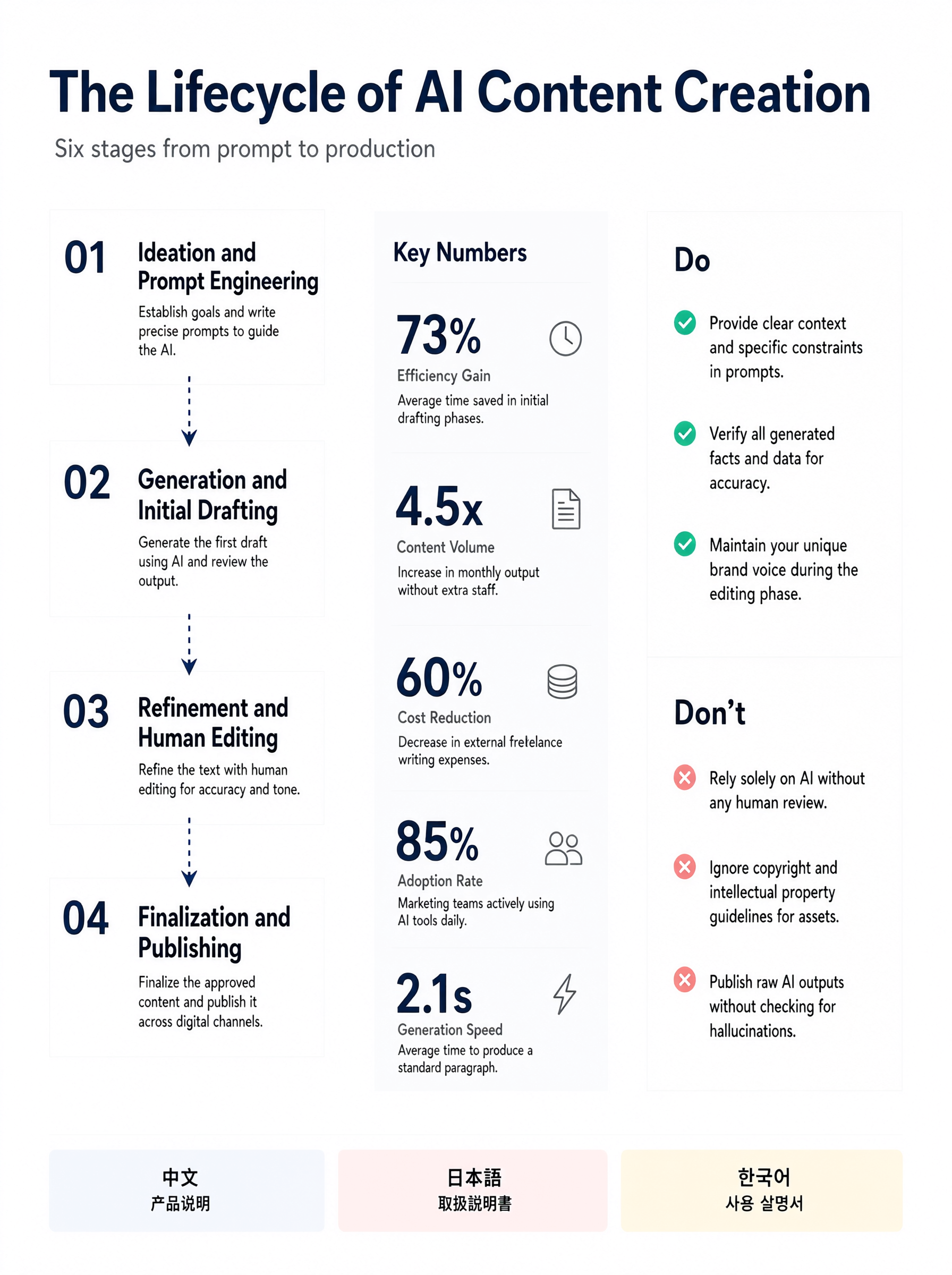
The result below:
What We Checked
| Check | What “pass” looks like | Result |
|---|---|---|
| Text legibility | All quoted strings crisp at 100% zoom, ~10–12px readable | Pass with minor caveat — English text is sharp and readable; the footer labels are split across two lines. |
| Layout adherence | 3 clean columns; correct 4/5/3+3 counts; no collapsed panels | Pass — four lifecycle boxes, five key-number rows, and three Do/three Don’t items are clearly present. |
| Multilingual rendering | Chinese product brief / Japanese user guide / Korean user guide — real glyphs, not scribbles | Pass — all three scripts render as recognizable, correct glyphs. |
| Detail & finish | Paper texture present, left-aligned text, sharp edges | Mostly pass — edges are clean and the background has a subtle paper-like texture. Footer text is centered inside the chips, so the left-alignment rule is not fully followed. |
| Speed & cost on Pixmax | Time per 1080×1440 render; credits consumed | Not verifiable from the image — generation time and credit usage were not displayed. |
What We Saw
The first render successfully reproduced the requested hierarchy: the navy serif header and gray subtitle are accurate, followed by a clearly separated three-column layout. The left column contains four numbered lifecycle stages connected by arrows; the center panel contains five statistic rows; and the right column contains three green “Do” items and three red “Don’t” items.
The multilingual footer is one of the strongest parts of the result. The Chinese, Japanese, and Korean characters are recognizable and correctly rendered, although each label is displayed as two centered lines rather than one continuous left-aligned string. The image also adds simple line icons beside the statistics, which improves scanability without introducing visual clutter.
The main limitations are that the exact output resolution, generation time, credits consumed, and any 4.5K or 12-language capability claims cannot be confirmed from this single image. The render demonstrates that Qwen Image 3.0 can produce a usable multilingual infographic in one pass, but a production decision should still include repeated runs and measured cost and speed data.
FAQs
What is Qwen Image 3.0?
Qwen Image 3.0 is Alibaba's third-generation image foundation model (July 2026) for text-to-image and image editing, focused on legible text, dense layouts, and realistic micro-detail.
Can Qwen Image 3.0 render readable text?
Yes — vendor specs claim legible text down to ~10px across 12 languages and 20+ fonts. Text must be dictated in quotes in the prompt, and results should be verified at final output size.
How is Qwen Image 3.0 different from Qwen Image 2.0?
The instruction budget jumps from ~1,000 to ~4,500 tokens, native rendering expands to 12 languages, and editing supports 1–3 reference images with preserved structure. Your old 2.0 prompts will underuse the model.
Does Qwen Image 3.0 support image editing?
Yes. The edit endpoint accepts one to three reference images plus a natural-language instruction, preserving identity and structure while applying changes — useful for swapping text or restyling assets.
Where can I try Qwen Image 3.0?
Qwen Chat, Alibaba Cloud Model Studio, fal.ai, Replicate, and ComfyUI all offer access. If you want it inside a full creative production workspace, Qwen Image 3.0 is now live on Pixmax.
The Bottom Line
Qwen Image 3.0 is currently the strongest option for text-heavy, information-dense AI imagery — if you change how you prompt. Treat the headline specs as claims to verify on your own renders, watch the per-image cost before you scale, and for a production path, try it on Pixmax, where Qwen Image 3.0 is now live.