Quick Answer: How to Create a Facebook Video Ad
To create a Facebook video ad, open Meta Ads Manager, click Create, choose an objective (Sales, Leads, or Traffic), define your audience and budget at the ad set level, then upload your video at the ad level with primary text, a headline, and a call-to-action button. Publish, wait for review (usually within 24 hours), and track results in Ads Manager. The whole flow takes about 15–30 minutes for a first-timer. If you have no video footage, you can turn images into a video inside Ads Manager, edit one with Canva or CapCut, or generate one from a script with an AI tool like Pixmax AI Video Agent.
What This Guide Covers
A Facebook video ad is a paid video placement that runs across Facebook, Instagram, Messenger, and the Meta Audience Network, targeted by Meta's algorithm to people most likely to respond. This guide answers the question "how to create a Facebook video ad" with five practical paths, a video specs checklist, budget guidance, and the mistakes advertisers on Reddit keep repeating.
Before you start, know this: there is no single "right" way to create a video ad for Facebook. The right method depends on what you have (footage, images, or just an idea), your budget, and how much time you want to spend. One thing I'd stress from the start — the video file is only half the job. The audience, budget, and how many variations you test decide most of the outcome. Beginners who watch conflicting YouTube tutorials get stuck choosing between Advantage+ and manual campaigns; if you have no Pixel data yet, pick one objective, start simple, and let Meta's algorithm learn.
5 Ways to Create a Facebook Video Ad (Comparison)
| Method | Best for | Time needed | Skill level | Cost |
|---|---|---|---|---|
| 1. Upload a video in Ads Manager | Anyone with existing video | 15–30 min | Beginner | Ad budget only |
| 2. Turn images into a video (Ads Manager) | No footage, have product photos | ~20 min | Beginner | Ad budget only |
| 3. Edit with Canva / CapCut | Full control, branded style | 1–3 hours | Intermediate | Free–$20/mo |
| 4. Generate from script with Pixmax | No footage, need many variations | 10–40 min per video | Beginner | Free trial + plan |
| 5. Promote an existing video post | Already have viral/engaging content | 5–10 min | Beginner | Ad budget only |
Method 1: Create a Facebook Video Ad Directly in Ads Manager
This is the standard path: you upload a finished video and publish it as an ad in the same tool Meta uses for every campaign.
- Go to Ads Manager and click the green Create button.
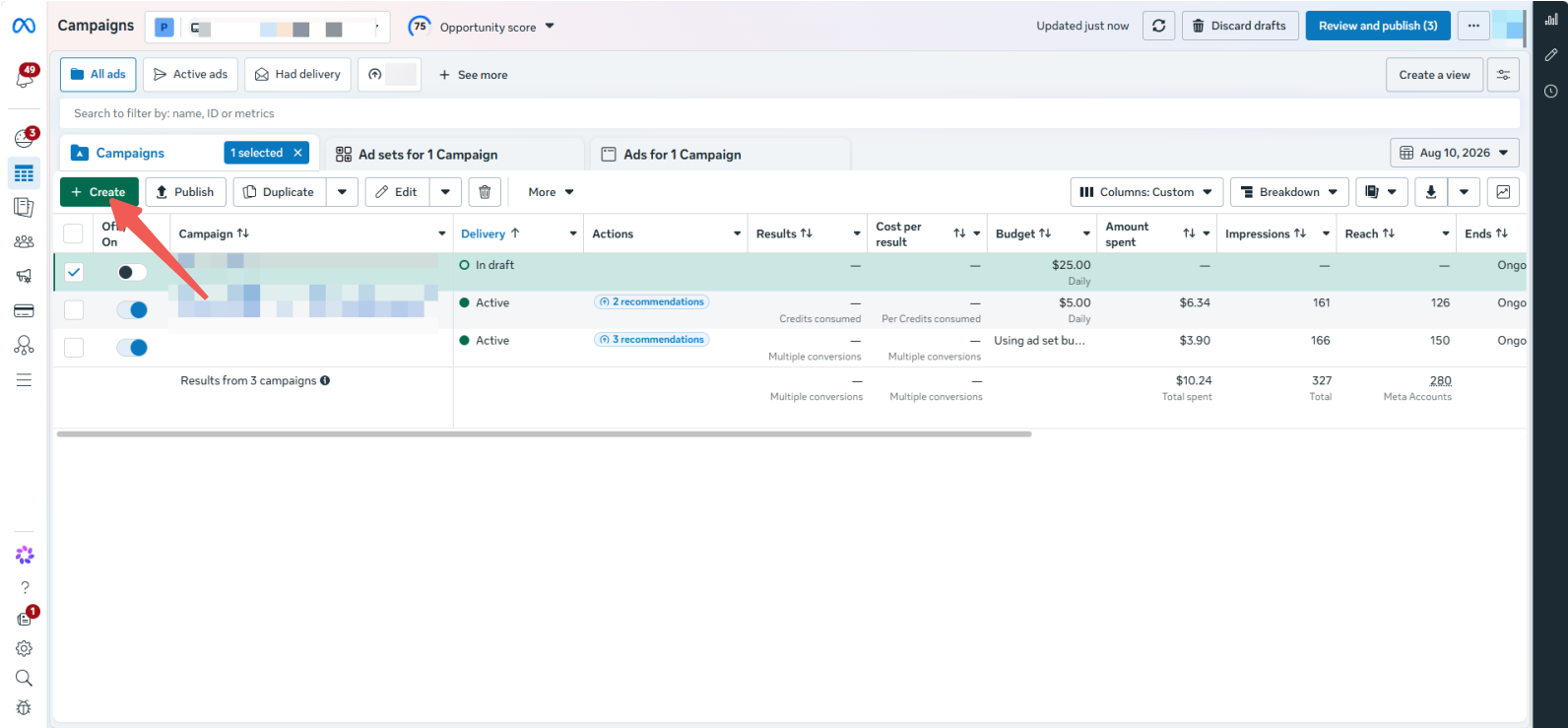
- Choose your campaign objective — Sales for e-commerce, Leads for signups, Traffic for visits. One objective per campaign.
- Name your campaign and set it up at the ad set level: audience, placements (leave Advantage+ placements on unless you have a reason), budget, and schedule.
- Scroll to the ad level and pick Single image or video as the format.
- Upload your video under the Media dropdown — MP4 or MOV, H.264, up to 4 GB. 1080p looks best on mobile.
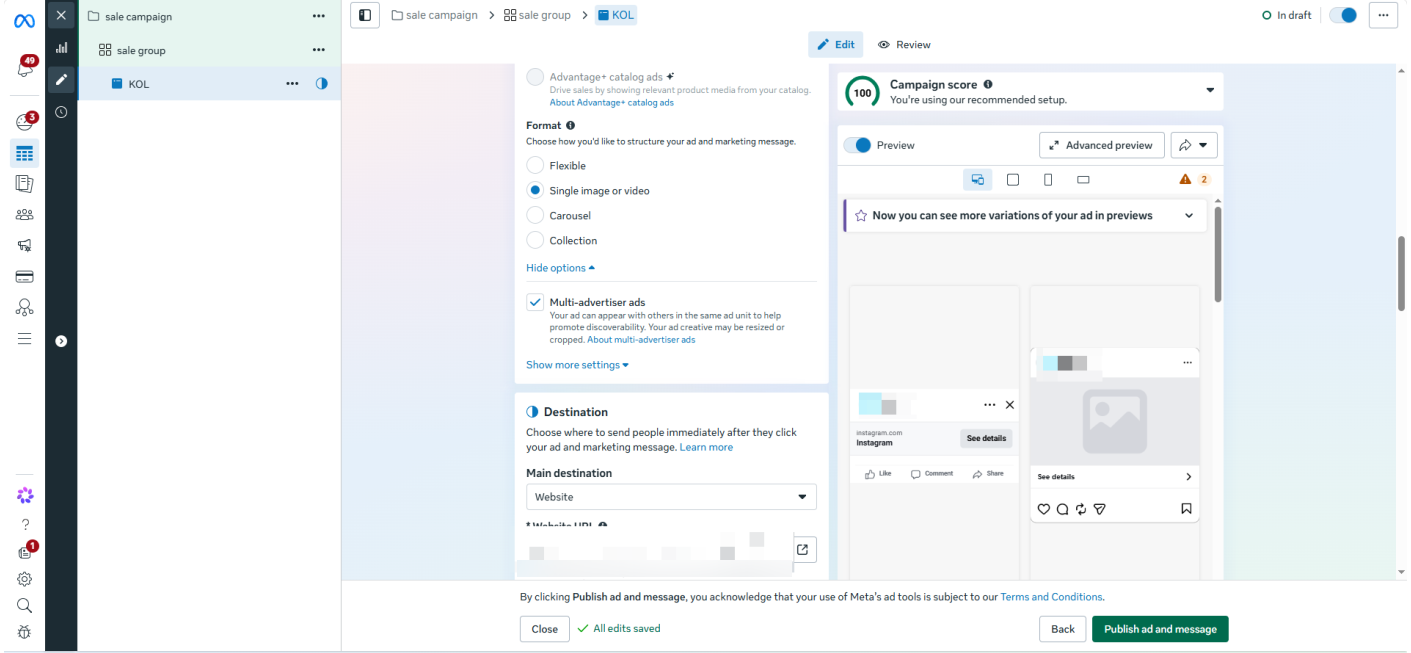
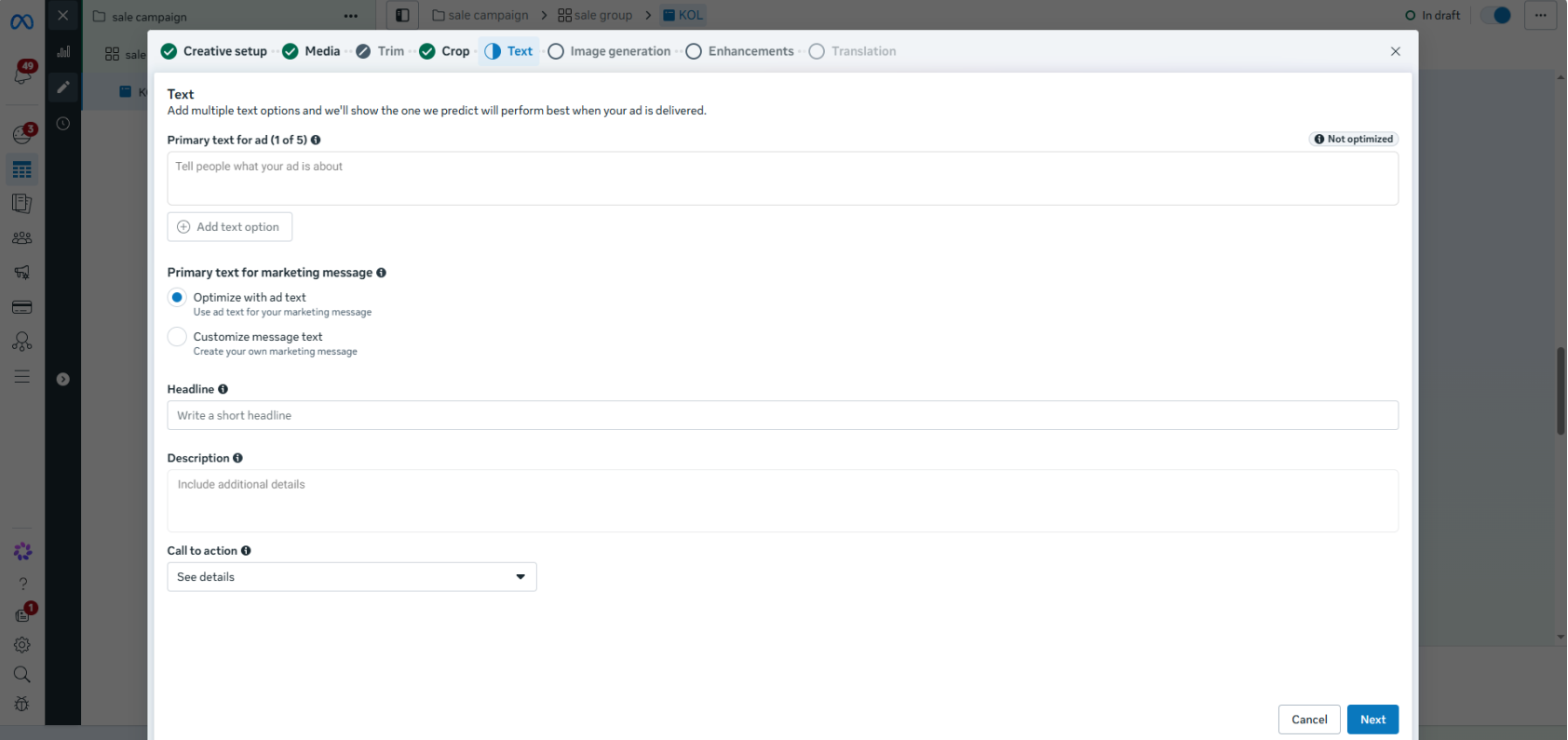
- Write the primary text (keep it under ~125 characters for mobile), a headline, and choose a call-to-action button like Shop Now or Learn More.
- Add a thumbnail: upload a custom cover image if you want control over the first impression.
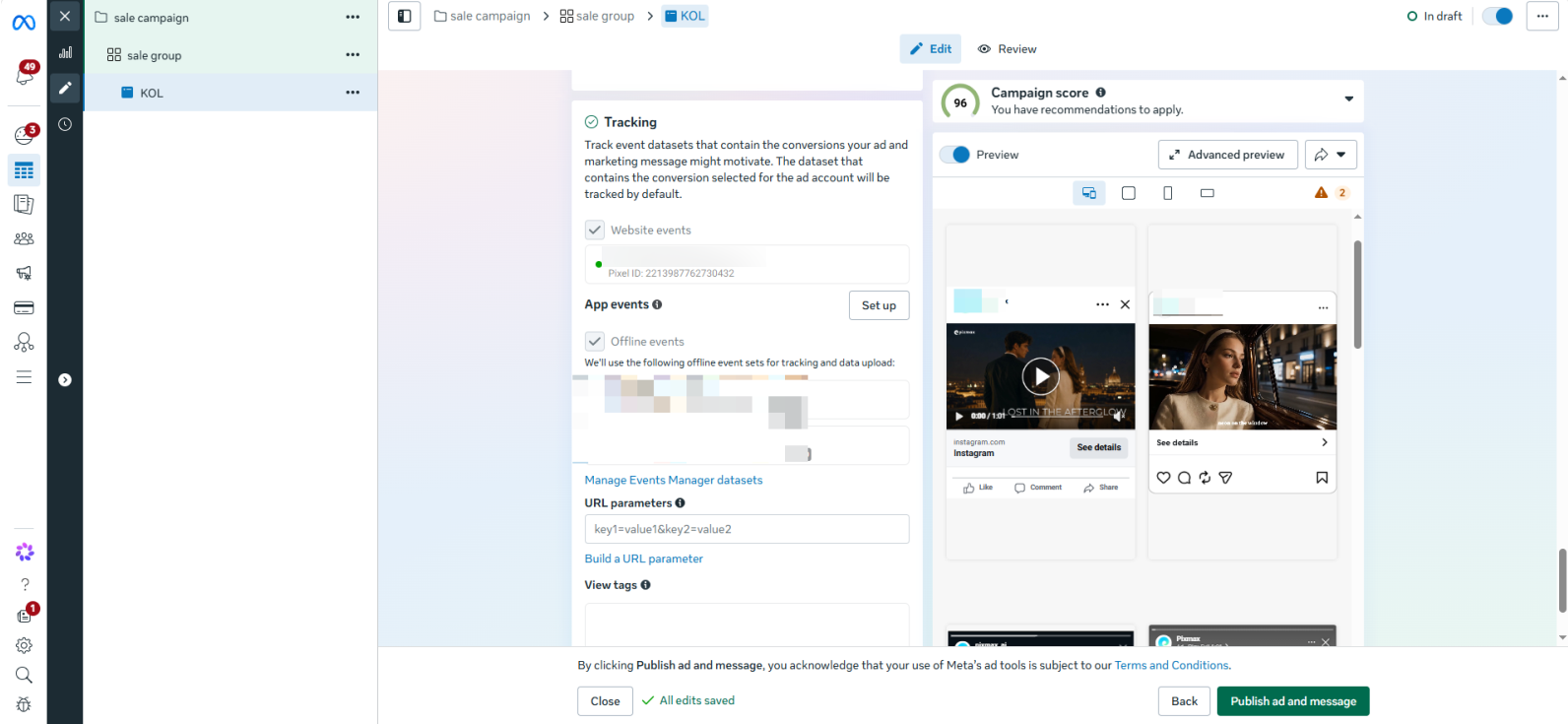
- Preview and publish — your ad enters review, which normally completes within 24 hours.
One detail most guides skip: upload the same video in a couple of lengths (15s and 30s) in separate ads within the same ad set, so Meta's system can test which one wins. On r/FacebookAds, advertisers with poor results usually share one trait — a single video creative running on a small budget with no variations to compare.
Method 2: Turn Images into a Video Ad Inside Ads Manager
This method creates a video from your existing images, entirely inside Meta's tooling — no editing software required.
When you reach the ad creative step, click the Edit dropdown next to your uploaded images and select Turn into video. Meta generates a mobile-first video from your photos using built-in templates, which you can customize with text overlays, backgrounds, and your logo before saving it as the ad's media.
This is the fastest route if you have product or lifestyle photos but no video clips. The trade-off is limited control: you're working inside Meta's templates, not a real editor, so the pacing and transitions stay basic. It's ideal for a quick launch or testing an offer before investing in production.
Method 3: Generate the Video from a Script with Pixmax (Fastest When You Have No Footage)
AI script-to-video means pasting your script or idea into a platform that plans, generates, and assembles a finished ad — no camera, actors, or editing skills required.
Pixmax AI Video Agent turns a script into a production-ready video through a four-step pipeline: you upload a script, prompt, or outline; it analyzes the story structure and scenes; it generates storyboards, visuals, and clips with consistent characters; then you refine and export with voiceovers, captions, and audio baked in.
Here's how to create a Facebook video ad with it:
- Open Pixmax AI and paste your ad script — even a rough idea works; it supports anything from short prompts to long-form scripts.
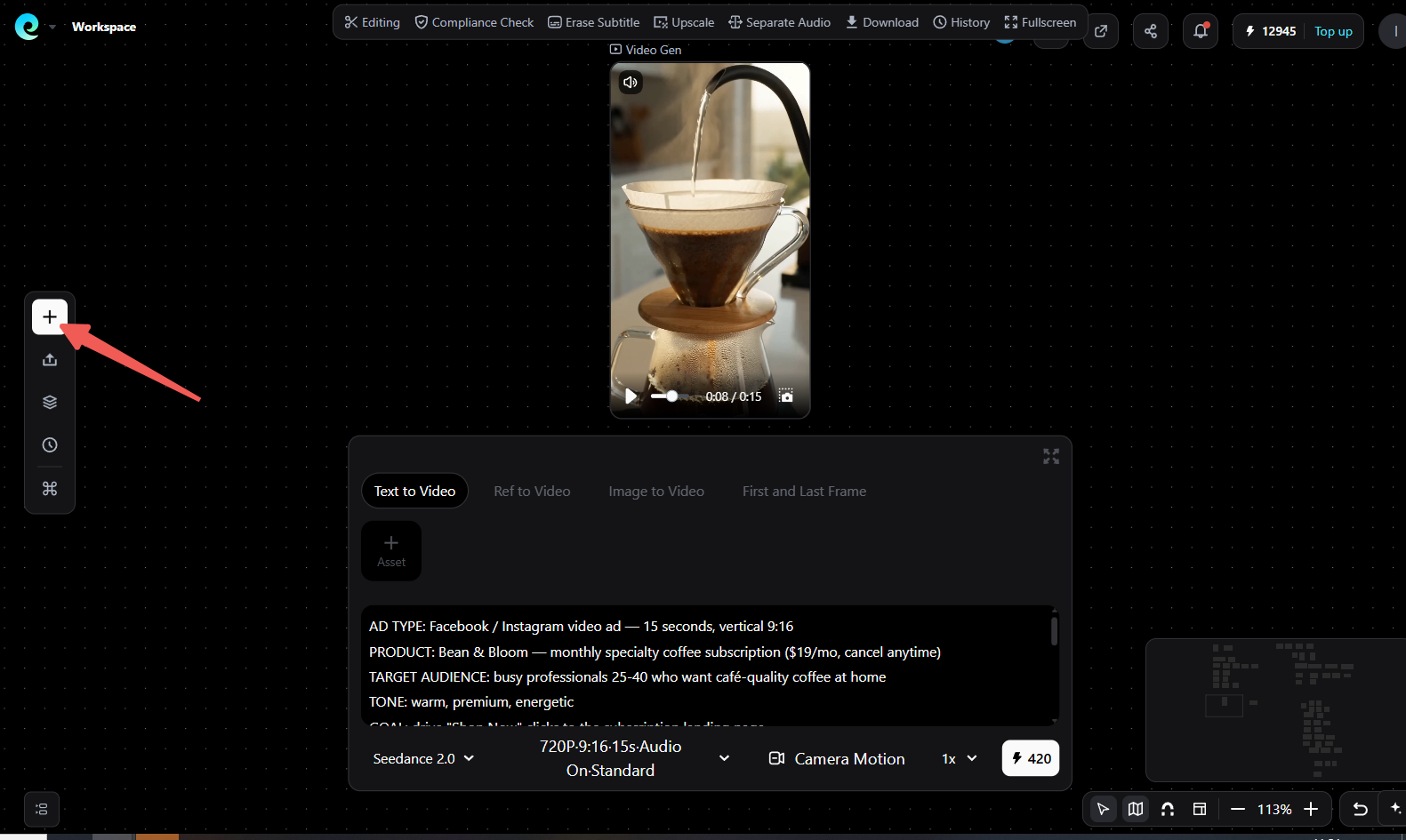
- Let it analyze and storyboard — it plans shots, camera angles, and pacing automatically.
- Generate and preview clips — review the AI-generated frames, tweak prompts and visuals in real time, and regenerate anything that misses the mark.
- Add voiceover, captions, and music, then export a social-ready video at the aspect ratio you need (vertical 9:16 for Reels/Stories, 4:5 or 1:1 for Feed).
- Upload the file to Ads Manager following Method 1's steps.
Example: A 15-Second Coffee Subscription Ad Script
To make the steps concrete, here's a complete ad script you can paste into the AI Video Agent as-is — a 15-second vertical ad for a monthly coffee subscription. Swap the product details with your own offer.
AD TYPE: Facebook / Instagram video ad — 15 seconds, vertical 9:16
PRODUCT: Bean & Bloom — monthly specialty coffee subscription ($19/mo, cancel anytime)
TARGET AUDIENCE: busy professionals 25-40 who want café-quality coffee at home
TONE: warm, premium, energetic
GOAL: drive "Shop Now" clicks to the subscription landing page

SCENE 1 (0-3s, hook): Close-up of a sleepy morning — alarm clock, someone rubbing
eyes. Text overlay: "Mornings are hard."
SCENE 2 (3-7s, problem): Overhead shot of a sad, empty coffee jar. Frustrated person
pushing a grinder. Overlay: "Bad coffee makes them worse."
SCENE 3 (7-11s, solution): Product showcase — the Bean & Bloom box opening in slow
motion: coffee bag, card, recipe card. Steam rising from a fresh pour-over. Person
taking first sip, smiling. Overlay: "Bean & Bloom. Fresh-roasted. Delivered monthly."
SCENE 4 (11-15s, offer + CTA): Hand holding the coffee bag next to the box, bold text:
"First bag 20% off — $19/mo, cancel anytime." Person raises mug to camera. End card
with logo and "Shop Now" button.Only have a one-line idea? The short prompt below produces the same ad in a rougher first pass, which you then refine scene by scene:
Short prompt: 15s vertical product ad for a monthly coffee subscription. Open with a
tired person waking up, show bad instant coffee, then reveal a premium coffee box
being opened with steam, end with "Shop Now" CTA. Warm, premium tone.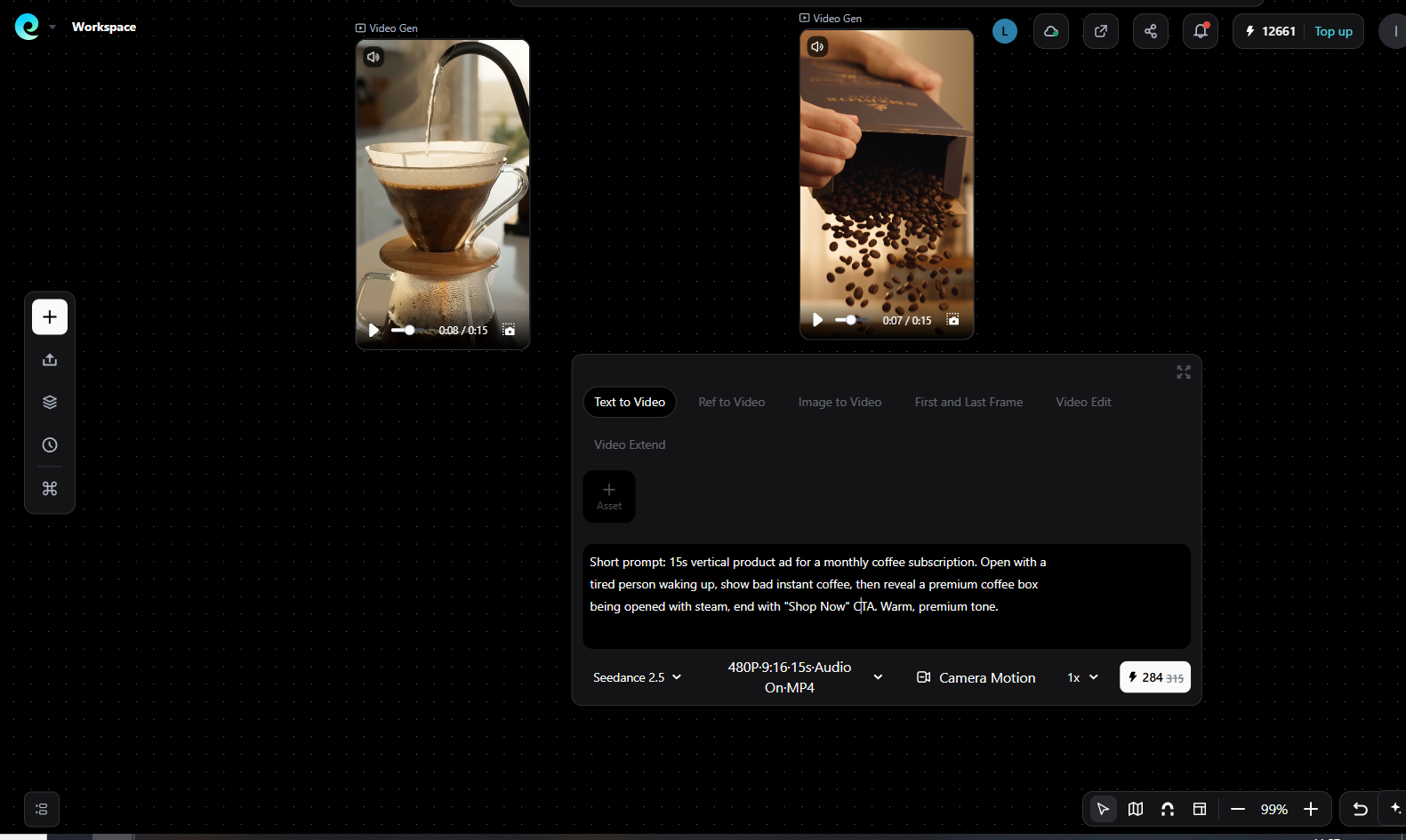
What to check while reviewing the generated storyboard and clips: character and product consistency across all four scenes (same person, same packaging design), the hook landing in the first 3 seconds, correct brand text in overlays, and the end card leading into the CTA button. Regenerate any scene that misses — you edit the whole pipeline, not just the export.
Because the whole pipeline stays editable, you can produce multiple ad variations — different hooks, different CTAs — in the time it takes to make one by hand. That directly addresses the "one creative" failure pattern: more testable variations, faster.
Pixmax is designed for e-commerce advertising and product showcase use cases, and it's accessible without production experience. Two honest caveats: always review AI-generated footage for brand and factual accuracy (Meta's ad policies still apply to AI content), and treat AI output as a starting point to refine rather than publish blindly.
Try Pixmax AI Video Agent Free
Method 4: Edit a Video Yourself with Canva or CapCut
DIY editing means assembling your own clips, photos, music, and captions in a consumer editing app, then exporting a finished file for Ads Manager.
Canva (browser-based) and CapCut (mobile/desktop) both have templates sized for Facebook and Instagram ads. Import your clips, add captions burned into the video, a hook in the first 3 seconds, your logo, and a CTA at the end, then export at 1080p in the aspect ratio you need.
When this method wins: when you have raw footage — filmed on a phone, UGC-style clips, or screen recordings — and you want brand-consistent output. Its limit: it's the most time-consuming of the five, and a 15-second ad can swallow an afternoon if you're perfectionist. If your clips are bad, editing won't save them; fix the footage first.
Method 5: Promote an Existing Video Post
This method converts a video you already published on your Facebook Page into an ad with two clicks — the lightest path of all.
In Ads Manager, choose Use existing post as your ad setup and select the video post from your Page. You keep the original engagement (comments, reactions, shares) as social proof, which can boost credibility — a genuinely underrated advantage for video ads.
Use this when a video is already performing well organically. Its limit: you're locked into the original post's format and copy, so it's a promotion play, not a creation play. It's also the natural first step for Pages that are too early to build a full campaign structure.
Facebook Video Ad Specs Checklist (2026)
Every method ends the same way — with a file that meets Meta's requirements. Save this checklist:
- File type: MP4 or MOV (H.264 video, AAC audio)
- Resolution: 1080p minimum; upload your highest-quality source
- Aspect ratio: 9:16 for Reels and Stories, 4:5 or 1:1 for Feed, 16:9 for in-stream/desktop
- Length: 1 second to 240 minutes allowed — but 15–30 seconds performs best; in-stream rewards 5–15s cuts
- Max file size: 4 GB
- Frame rate: 30 fps recommended
- Captions: burn them in — most people watch with sound off
- Safe zones: keep text and logos out of the top ~250px and bottom ~340px on Stories placements
Budget, Testing, and Realistic Expectations
How much you need depends on your objective and competition, not on the video itself. Community experience on Reddit points to roughly $10–50/day as a realistic testing range for small businesses; a $200/month budget can produce leads, but advertisers running tiny budgets with a single creative routinely report poor lead quality. My view: for conversion campaigns, a budget too small to leave the learning phase is a bigger failure risk than a mediocre video.
Set your expectations in the right order: launch one campaign with 2–3 video variations → let it run 5–7 days without touching anything → kill losers, duplicate winners. Also track the right numbers: hook rate (3-second views), hold rate, and cost per result — not just views or likes.
Common Mistakes and How to Avoid Them
- Running one creative. Single-video accounts fatigue fast; test 2–3 variations from day one.
- No captions. Roughly 85% of social video is watched muted — text overlay is not optional.
- Wrong aspect ratio. A 16:9 file in a 9:16 placement gets letterboxed into invisibility.
- Starting with a logo intro. You have about 3 seconds; open with the product or the problem.
- Judging results on day two. Meta's learning phase needs data; changing budgets daily restarts it.
FAQs
How much does it cost to create a Facebook video ad?
Creating the ad itself is free — you only pay when it runs. Ad budgets commonly start around $10–50/day for testing; actual cost per click or result varies by industry, audience, and creative quality.
How long should a Facebook video ad be?
15–30 seconds is the performance sweet spot for most objectives. In-stream placements reward 5–15 second cuts; longer videos work for retargeting audiences who already know you.
Can I create a Facebook video ad without appearing on camera or having footage?
Yes — three ways: turn images into a video inside Ads Manager (Method 2), edit stock clips in Canva or CapCut, or generate a full video from a script with an AI tool like Pixmax (Method 4).
What size and format does a Facebook video ad need?
MP4 or MOV with H.264 video and AAC audio, up to 4 GB. Use 1080p resolution: 9:16 for Reels/Stories, 4:5 or 1:1 for Feed, 16:9 for in-stream.
Do I need a Facebook Page and Ads Manager account?
Yes. Ads run from a Facebook Page, and Ads Manager is where you create, budget, and publish the campaign. A business portfolio with a payment method is required for the first launch.
Why is my Facebook video ad getting views but no sales?
Check three things in order: your landing page (is it fast, mobile-friendly, and consistent with the ad?), your audience (too broad or too narrow?), and your creative (one weak video can't be diagnosed — test variations). Low-quality leads with small budgets and single creatives is the most repeated pattern in ad community threads.
Conclusion
Creating a Facebook video ad is a 15-minute task once the video itself exists — and the video can come from footage you already have, from images, from a simple editor, or from an AI agent that builds it from your script. Start with Method 1 to learn the workflow, use Methods 2 or 4 when you lack footage, and always test multiple variations before scaling budget. Thanks for reading — pick the method that matches what you have today and launch your first video ad this week.