Quick Answer: Is GLM 5.2 Worth It?
Yes—for long-horizon coding and agent work, GLM 5.2 is the strongest open-weight model you can run today. Z.ai's flagship 753B MoE ships a 1M-token context, MIT weights, and near-frontier agentic coding at $1.40 input / $4.40 output per million tokens, against Claude Opus 4.8's $5/$25. The honest catch: for multi-hour autonomous and systems-level tasks, Opus 4.8 still leads (SWE-Marathon 26.0 vs 13.0). Verdict: buy it for the volume, escalate the summit to a flagship. Real spend, not the rate card, is the number to watch—Max-effort reasoning burns far more output tokens than the headline implies. To prove it to a customer in minutes, run GLM 5.2 and DeepSeek V4 Pro side by side on Pixmax and route the hard 5% to a Claude flagship.
What GLM 5.2 Actually Is
GLM 5.2 is a Mixture-of-Experts reasoning model from Zhipu's Z.ai, released June 16, 2026. It is the first open-weight model close enough to the frontier that "default," not "budget compromise," is the honest label.
| Signal | Value |
|---|---|
| Developer | Z.ai (Zhipu AI, Tsinghua spin-out) |
| Parameters | 753B MoE, ~40B active |
| License | MIT (open weights, self-host) |
| Context / max output | 1M tokens / 128K–131K |
| Reasoning effort | High / Max |
| Modality | Text only (no image input) |
| API price | $1.40 in / $4.40 out / $0.26 cached per 1M |
The context window is the launch story. At 1M tokens it holds a full repo, five times GLM-5.1's 200K, and Z.ai trained it specifically on long coding-agent trajectories—not just padded the spec sheet. Output caps at ~128–131K tokens depending on mode.
GLM 5.2 Benchmarks: The Numbers Worth Trusting
Read these in three buckets, because mixing them hides the truth.
- Long-horizon coding (GLM's strength): SWE-bench Pro 62.1, Terminal-Bench 2.1 ~81.0, FrontierSWE 74.4. On Z.ai's own cross-model table it lands within a point of Opus 4.8 on FrontierSWE and ahead of GPT-5.5 on SWE-bench Pro.
- Reasoning/math (elite but mixed): AIME 2026 99.2 (top of the vendor table), GPQA-Diamond 91.2, HLE 40.5 text-only / 54.7 with tools.
- The honest caveat: SWE-Marathon 13.0 vs Opus 4.8's 26.0, Terminal-Bench 3.0 4.6. Multi-hour autonomous and systems work is where the premium still pays.
Sourcing note: most of these are vendor-reported from the model card. The one independent signal that matters is Z.ai's #1 open-weight standing on the Artificial Analysis Intelligence Index (51 points)—that was the move that crowned it. Level of trust: part vendor, part independent. Treat every number as directional until independent re-runs land.
GLM 5.2 Pricing: The Rate Card vs. The Real Bill
List price is ruthlessly competitive: $1.40 in, $4.40 out, $0.26 cached input—about 5.7× cheaper than Opus 4.8 on output tokens. Cached input at that rate, with cache storage currently free, crushes agent loops that re-read the same context hundreds of times.
But cheap per token is not cheap per task. GLM 5.2 reasons verbosely; a Max-effort session can emit tens of thousands of output tokens you pay top rate for. On a measured sweep, GLM 5.2 came in around $1.99 per 1,000 coding tasks—below Opus 4.8's $4.05, but well above lean coders like DeepSeek V4-Flash's $0.13. Budget against current Z.ai Coding Plan terms too, which have shifted since launch, not launch-week screenshots. Reddit and X users consistently flag quota burn and slow time-to-first-token as the real frictions.
GLM 5.2 vs DeepSeek V4 Pro
Two MIT open-weight flagships, built differently—and both live in the same Pixmax model hub. GLM 5.2 wins the long game: SWE-bench Pro 62.1 vs 55.4, FrontierSWE 74.4 vs 29.0. DeepSeek V4 Pro wins the algorithm game—LiveCodeBench 93.5% (#1 of any model), Codeforces 3206, HMMT 95.2—and is roughly 5× cheaper on output ($0.87 vs $4.40) with a 384K output ceiling versus GLM's 128K. GLM is ~3× faster (145–168 tok/s against ~57–66). Full numbers live in this GLM 5.2 vs DeepSeek V4 Pro breakdown.
The working consensus, and I agree: GLM 5.2 builds and audits long engineering tasks; DeepSeek V4 Pro is the better competitive coder at a tenth of the per-task cost. Route, don't pray.
GLM 5.2 vs Claude Opus 4.8
Opus 4.8 is not dethroned; it is specialized. It doubles GLM on SWE-Marathon (26.0 vs 13.0) and leads Terminal-Bench 2.1 (85.0 vs 81.0)—the longest, most tool-heavy work. GLM's answer is economics: 90–95% of the frontier's long-horizon coding at under a fifth of the output price, plus open weights as insurance. Practical rule: GLM for the volume, Opus for the summit.
How to Run GLM 5.2 on Pixmax
Pixmax runs GLM 5.2 inside its canvas-style workspace, not as a separate API console. Click the plus button on the left toolbar, choose Text, and Pixmax adds a Text Gen node to the canvas. In the current workspace UI, that text node can open with GLM 5.2 selected, so you can start testing prompts directly from the same workspace where your image, video, audio, 3D, storyboard, and editor nodes live.
That matters because Pixmax is built around connected creative workflows. Instead of switching between separate model dashboards, you can keep a GLM 5.2 text step next to visual generation and editing steps on the same canvas, then use the text output as planning, prompt drafting, evaluation notes, or production direction for the rest of the project.
Using GLM 5.2 in the Pixmax Workspace
The practical workflow is canvas-first:
- Add a Text node. In the workspace, click the left-side plus button and choose Text. Pixmax creates a Text Gen card on the canvas.
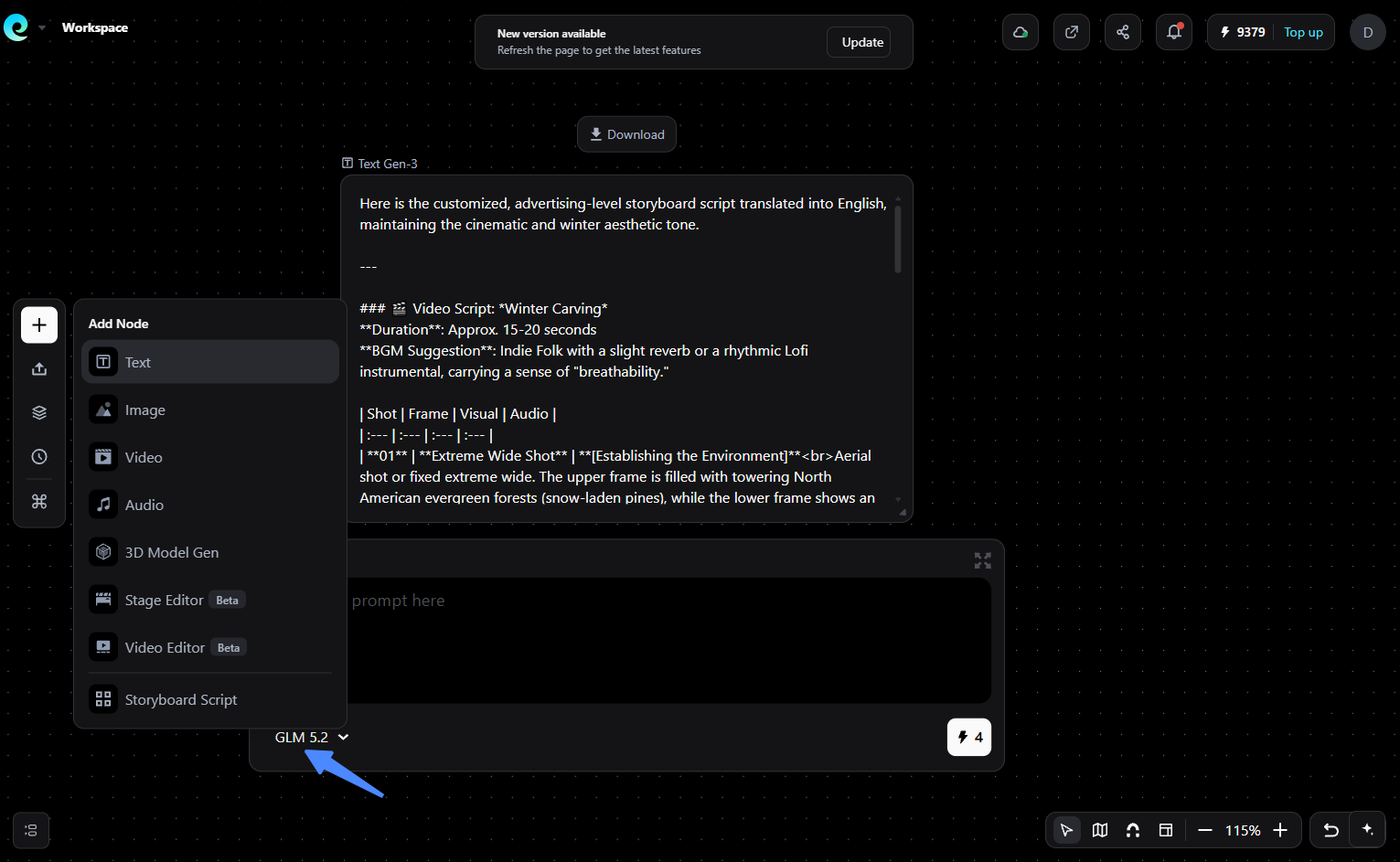
- Enter your prompt. Double-click the text field and write the task you want GLM 5.2 to handle, such as comparing model outputs, drafting prompts, creating a production plan, or summarizing requirements.
- Choose the model you want to test. Use GLM 5.2 for long-context reasoning and planning, then compare it with other available text models when the task calls for a side-by-side judgment.
- Run the node and review the result. Keep the output in the workspace so you can refine the prompt, duplicate the setup, or use the result as input for the next creative step.
- Connect it to the broader project. Add Image, Video, Audio, 3D Model Gen, Stage Editor, Video Editor, or Storyboard Script nodes from the same plus menu when you want the text result to support a larger creative workflow.
Who Should Switch, Who Shouldn't
- Switch now for high-volume coding and agent loops where 90–95% of frontier quality at a fifth of the price wins the budget argument.
- Route, don't replace if your work spans both routine execution and hard long-horizon tasks—send volume to GLM, escalate the 5% that needs a flagship.
- Skip GLM 5.2 for fastest possible interactive latency (thinking-first design means visible time-to-first-token) or for image/document-vision workflows: it's text-only.
Run GLM 5.2 against DeepSeek V4 Pro on your own prompts → Try Pixmax for free
Bottom Line
GLM 5.2 is the first open-weight coding model that reads as a default, not a compromise—my score ~8.5/10. It doesn't unseat Claude Opus 4.8 at the summit, and DeepSeek V4 Pro beats it on pure price and competitive coding, but for long-horizon engineering at scale, nothing open comes close. Run it on Pixmax to compare GLM 5.2 with other text models in a canvas workflow, then connect the result to prompting, storyboarding, and creative production in the same workspace.
FAQs
Is GLM 5.2 the Best Model for Coding Agents?
For long-horizon engineering, yes—it leads SWE-bench Pro (62.1) and FrontierSWE among open-weight models. For competitive programming or multi-hour autonomous work, DeepSeek V4 Pro and Claude Opus 4.8 respectively stay ahead.
How Much Does GLM 5.2 Cost?
$1.40 per million input tokens and $4.40 per million output, with $0.26 cached input on Z.ai's first-party API. Third-party gateways often list lower rates; verify at checkout.
Is GLM 5.2 Open Source?
Yes—MIT-licensed weights on Hugging Face under `zai-org`, letting you self-host, fine-tune, or run it without vendor lock-in or regional limits.
How Does GLM 5.2 Compare to DeepSeek V4 Pro?
GLM wins long-horizon software engineering (FrontierSWE 74.4 vs 29.0) and is ~3× faster; DeepSeek wins competitive programming (LiveCodeBench 93.5%) and is ~5× cheaper per output token.
Can I Run GLM 5.2 on Pixmax?
Yes—Pixmax supports GLM 5.2 in its workspace, so you can add it as a Text Gen step and use the result alongside creative nodes for image, video, audio, 3D, storyboard, and editor workflows.