
'%3e%3cpath%20id='Vector'%20d='M8.0074%200.858015C8.09804%200.858015%208.18779%200.875868%208.27153%200.910556C8.35528%200.945243%208.43137%200.996085%208.49546%201.06018C8.55955%201.12427%208.6104%201.20036%208.64508%201.2841C8.67977%201.36785%208.69762%201.4576%208.69762%201.54824C8.69762%201.63889%208.67977%201.72864%208.64508%201.81238C8.6104%201.89612%208.55955%201.97221%208.49546%202.03631C8.43137%202.1004%208.35528%202.15124%208.27153%202.18593C8.18779%202.22062%208.09804%202.23847%208.0074%202.23847H2.4128C2.2795%202.23798%202.14742%202.26378%202.02411%202.3144C1.9008%202.36503%201.78869%202.43947%201.69419%202.53348C1.59969%202.62749%201.52466%202.73922%201.4734%202.86227C1.42214%202.98531%201.39566%203.11726%201.39546%203.25056V13.0263C1.39744%2013.2947%201.50583%2013.5514%201.69683%2013.74C1.88784%2013.9286%202.14586%2014.0338%202.4143%2014.0324H13.6012C13.8699%2014.0338%2014.1282%2013.9284%2014.3192%2013.7395C14.5103%2013.5505%2014.6185%2013.2935%2014.6201%2013.0248V8.13542C14.626%207.95463%2014.702%207.78322%2014.832%207.65743C14.962%207.53163%2015.1358%207.4613%2015.3167%207.4613C15.4976%207.4613%2015.6714%207.53163%2015.8014%207.65743C15.9314%207.78322%2016.0074%207.95463%2016.0133%208.13542V13.0233C16.0118%2013.3386%2015.9483%2013.6505%2015.8262%2013.9412C15.7042%2014.2319%2015.5261%2014.4957%2015.3022%2014.7176C15.0782%2014.9395%2014.8127%2015.1151%2014.5208%2015.2344C14.229%2015.3537%2013.9165%2015.4143%2013.6012%2015.4128H2.41205C1.7757%2015.4158%201.1642%2015.1661%200.711918%2014.7184C0.259635%2014.2708%200.0035724%2013.6619%20-3.77186e-08%2013.0255L-3.77186e-08%203.24981C0.0011795%202.93434%200.0645214%202.6222%200.186405%202.33122C0.308288%202.04025%200.486323%201.77615%200.710333%201.55402C0.934342%201.33189%201.19993%201.15609%201.49192%201.03667C1.78392%200.917241%202.09658%200.856534%202.41205%200.858015H8.0074Z'%20fill='var(--fill-0,%20white)'/%3e%3cpath%20id='Vector_2'%20d='M5.94571%205.79615C5.94631%205.63186%205.99277%205.471%206.07986%205.33168C6.16695%205.19237%206.2912%205.08014%206.43863%205.00764C6.58694%204.93436%206.75258%204.90337%206.91736%204.91806C7.08213%204.93275%207.23967%204.99256%207.37269%205.09091L10.7488%207.59899C10.8593%207.6806%2010.949%207.78699%2011.0109%207.90961C11.0727%208.03222%2011.105%208.16764%2011.105%208.30498C11.105%208.44231%2011.0727%208.57773%2011.0109%208.70034C10.949%208.82296%2010.8593%208.92935%2010.7488%209.01096L7.37269%2011.522C7.23961%2011.62%207.08213%2011.6795%206.91751%2011.6939C6.75288%2011.7083%206.58747%2011.6772%206.43938%2011.6038C6.29198%2011.5311%206.1678%2011.4188%206.08084%2011.2793C5.99389%2011.1399%205.9476%2010.9789%205.94722%2010.8146V5.7969L5.94571%205.79615ZM7.33968%209.81898L9.3796%208.30498L7.34043%206.78948V9.81898H7.33968ZM12.8562%200.926288C12.8985%200.825545%2012.9696%200.739528%2013.0605%200.679036C13.1515%200.618543%2013.2583%200.586271%2013.3675%200.586271C13.4768%200.586271%2013.5836%200.618543%2013.6746%200.679036C13.7655%200.739528%2013.8366%200.825545%2013.8788%200.926288L14.2495%201.82659C14.3059%201.96232%2014.4138%202.0702%2014.5496%202.12668L15.4574%202.49281C15.5584%202.53325%2015.645%202.60304%2015.706%202.69317C15.767%202.7833%2015.7996%202.88964%2015.7996%202.99847C15.7996%203.10731%2015.767%203.21364%2015.706%203.30377C15.645%203.3939%2015.5584%203.46369%2015.4574%203.50414L14.5496%203.87251C14.4822%203.9002%2014.421%203.94098%2014.3694%203.99249C14.3179%204.044%2014.2771%204.10522%2014.2495%204.17261L13.8788%205.07291C13.8366%205.17365%2013.7655%205.25967%2013.6746%205.32016C13.5836%205.38065%2013.4768%205.41292%2013.3675%205.41292C13.2583%205.41292%2013.1515%205.38065%2013.0605%205.32016C12.9696%205.25967%2012.8985%205.17365%2012.8562%205.07291L12.4864%204.17261C12.4587%204.1052%2012.418%204.04396%2012.3664%203.99244C12.3149%203.94093%2012.2537%203.90016%2012.1863%203.87251L11.2785%203.50414C11.1774%203.46369%2011.0908%203.3939%2011.0298%203.30377C10.9688%203.21364%2010.9362%203.10731%2010.9362%202.99847C10.9362%202.88964%2010.9688%202.7833%2011.0298%202.69317C11.0908%202.60304%2011.1774%202.53325%2011.2785%202.49281L12.187%202.12668C12.2545%202.09907%2012.3157%202.05832%2012.3672%202.0068C12.4188%201.95527%2012.4595%201.89401%2012.4871%201.82659L12.8562%200.926288Z'%20fill='var(--fill-0,%20white)'/%3e%3c/g%3e%3cdefs%3e%3cclipPath%20id='clip0_0_47'%3e%3crect%20width='16'%20height='16'%20fill='white'/%3e%3c/clipPath%3e%3c/defs%3e%3c/svg%3e)

'/%3e%3c/g%3e%3c/svg%3e)
'/%3e%3c/g%3e%3c/svg%3e)
'/%3e%3c/g%3e%3c/svg%3e)

'/%3e%3c/g%3e%3c/svg%3e)
GPT Image 2, Gemini 3.1 Pro, and Eleven v3: The AI Model Stack Behind Modern Video Creation
Blog
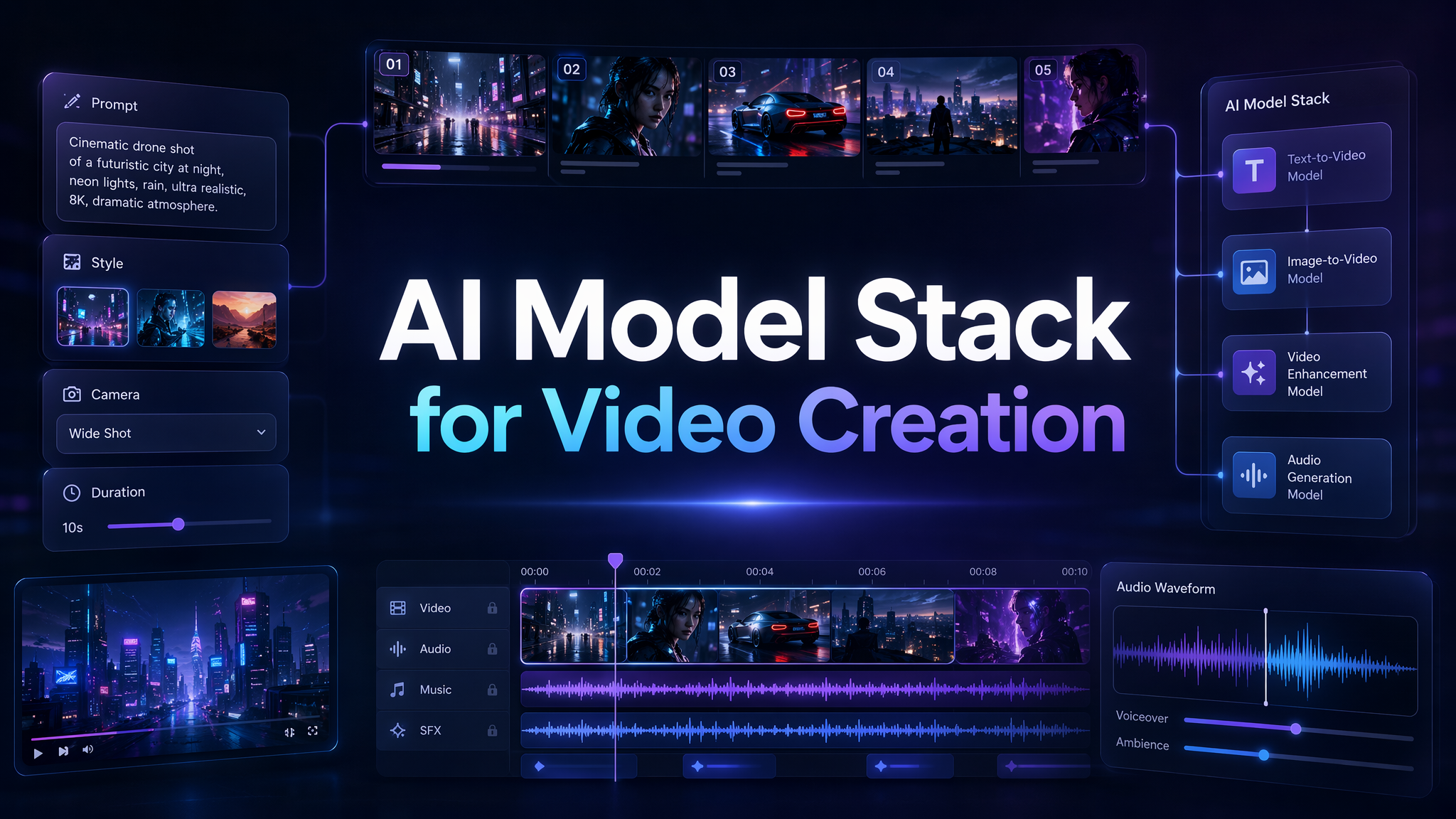
A modern AI video is rarely made by one model alone. A strong short film, product ad, social clip, AI comic drama, or virtual human video may start with strategic thinking, move into visual design, become a video scene, and end with voice, sound, pacing, and campaign adaptation. In that process, different AI models play different roles. GPT Image 2 can help with image generation and editing. Gemini 3.1 Pro can support scripting, storyboarding, creative reasoning, and complex planning. Eleven v3 can bring voice, emotion, multilingual narration, and multi-speaker control into the production layer.
That is why the future of AI video generation is not just about asking, 鈥淲hich AI video maker is the best? - A better question is: 鈥淲hat is the right AI model stack for the creative job? - At Pixmax.ai, we believe the next generation of AI video creation platform will not be a single magic button. It will be a connected workspace where models, prompts, images, videos, audio, teams, and reusable workflows come together. The best creative work will come from orchestration, not isolated generation.
Why Modern AI Video Creation Needs More Than One AI Model
The early story of AI video generation was simple: type a prompt, generate a clip, share the result. That was enough when the goal was to impress people with the fact that AI could make video at all. But creators have moved past the novelty phase. Marketers need campaign assets. Studios need consistent scenes. Social media teams need weekly production. E-commerce brands need product videos that look polished and on-brand. Virtual human teams need believable faces, gestures, voices, and emotional delivery.
This is where single-tool thinking starts to break.
A video is not one asset. It is a stack of creative decisions. Before a scene becomes video, someone has to define the idea, audience, message, mood, structure, visual direction, camera language, character behavior, pacing, and audio tone. If those decisions are weak, even the most advanced AI video generator will produce something that looks impressive but feels unusable.
Many AI video makers still focus too narrowly on the generation moment. They ask for a prompt, produce a clip, and leave the user to fix everything else somewhere else. The result is fragmentation. Creators may use one tool for ideation, another for reference images, another for video generation, another for voice, another for editing, and another for asset management. That workflow can work for experiments, but it becomes messy when the goal is repeatable production.
The real challenge is not whether AI can generate content. It can. The real challenge is whether creators can control, connect, and scale that content. That is why GPT Image 2, Gemini 3.1 Pro, Eleven v3, and Pixmax.ai matter as a model stack.
Pixmax.ai Turns AI Models into a Creative Workflow
At Pixmax.ai, our view is that AI video generation is becoming an orchestration problem. The strongest creators and teams will not simply pick one model and stop there. They will use the right model at the right stage of the workflow, then connect those outputs into a coherent production system.
This is the reason Pixmax.ai is built as an all-in-one AI creative workspace. We help creators, studios, marketers, and enterprise teams turn ideas into cinematic videos, visual stories, e-commerce ads, AI comic dramas, live-action short dramas, virtual human content, and social media videos. That means Pixmax.ai is not just an AI video maker for one-off outputs. It is an AI video creation platform for building repeatable visual production workflows.
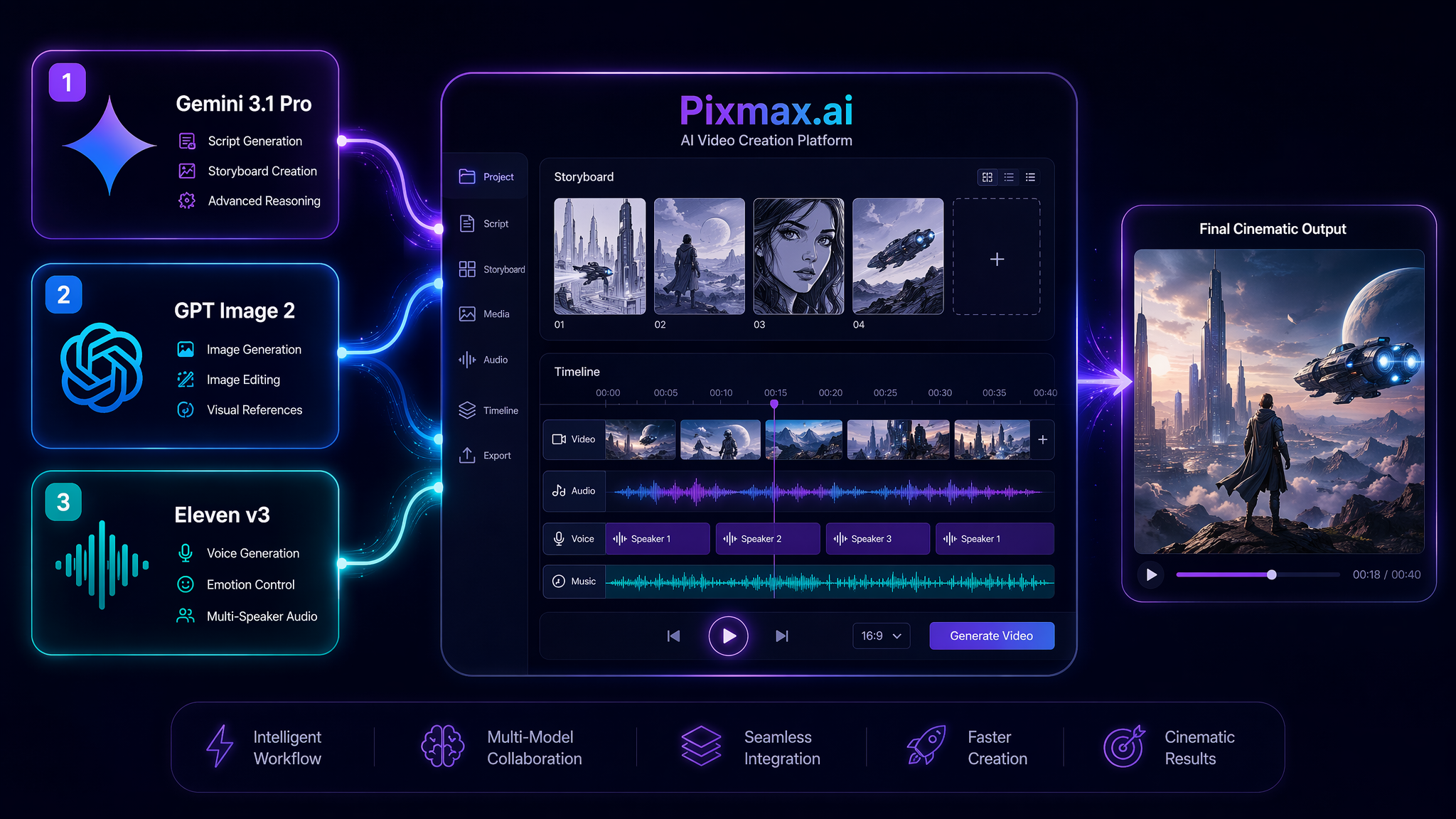
In a modern AI model stack, Gemini 3.1 Pro can sit near the beginning of the process. It is useful for complex reasoning, creative planning, campaign structure, script development, storyboard logic, and prompt strategy. If a team is trying to create a product launch video, Gemini 3.1 Pro can help turn a business goal into a creative brief, shot list, platform adaptation plan, and prompt framework.
GPT Image 2 can support the visual layer. It can help generate concept art, product references, character looks, background designs, moodboards, and edited visuals. Before asking an AI video generator to create motion, creators often need a strong visual anchor. This is especially useful for image-to-video creation, e-commerce videos, cinematic scenes, and AI comic drama production.
Eleven v3 can support the voice and performance layer. For storytelling, voice is not decoration. It changes how a scene feels. A calm narrator, emotional monologue, fast-paced ad voiceover, or multi-character dialogue can completely reshape the viewer鈥檚 experience.
Pixmax.ai connects this model power to real production needs: reusable workflows, team collaboration, project organization, professional creative control, and scalable content creation. The value is not only access to models. The value is turning model outputs into a working creative pipeline.
How the AI Model Stack Works: From Script to Image, Video, and Voice
A practical AI video creation workflow usually starts with strategy, not generation. Before opening an AI video generator, the creator needs to know the purpose of the asset. Is it a TikTok hook? A YouTube Shorts teaser? A product showcase? A cinematic brand film? A virtual human introduction? A short drama scene? Each use case requires a different model stack.
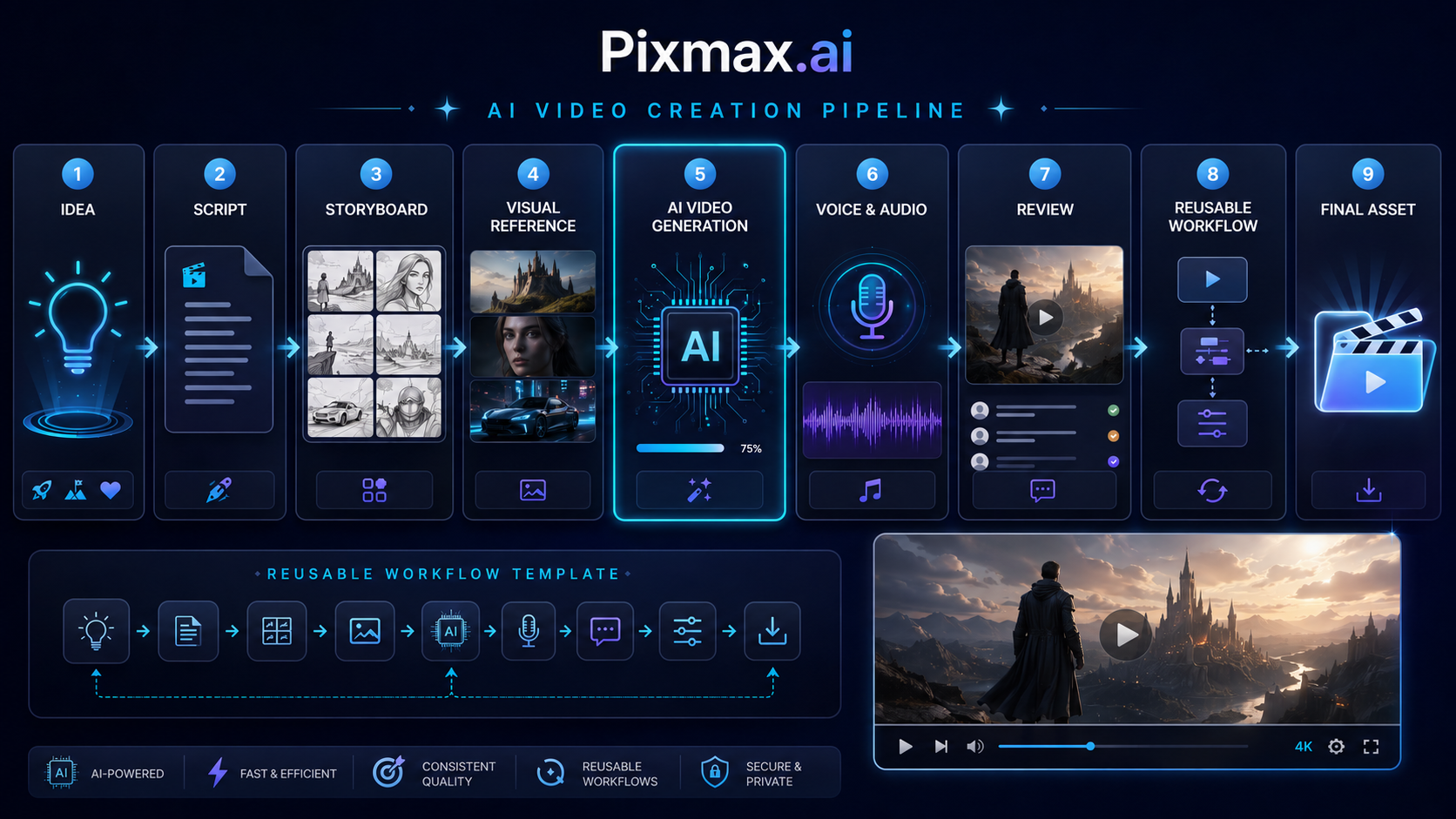
Here is a simple workflow we use to think about modern AI video production:
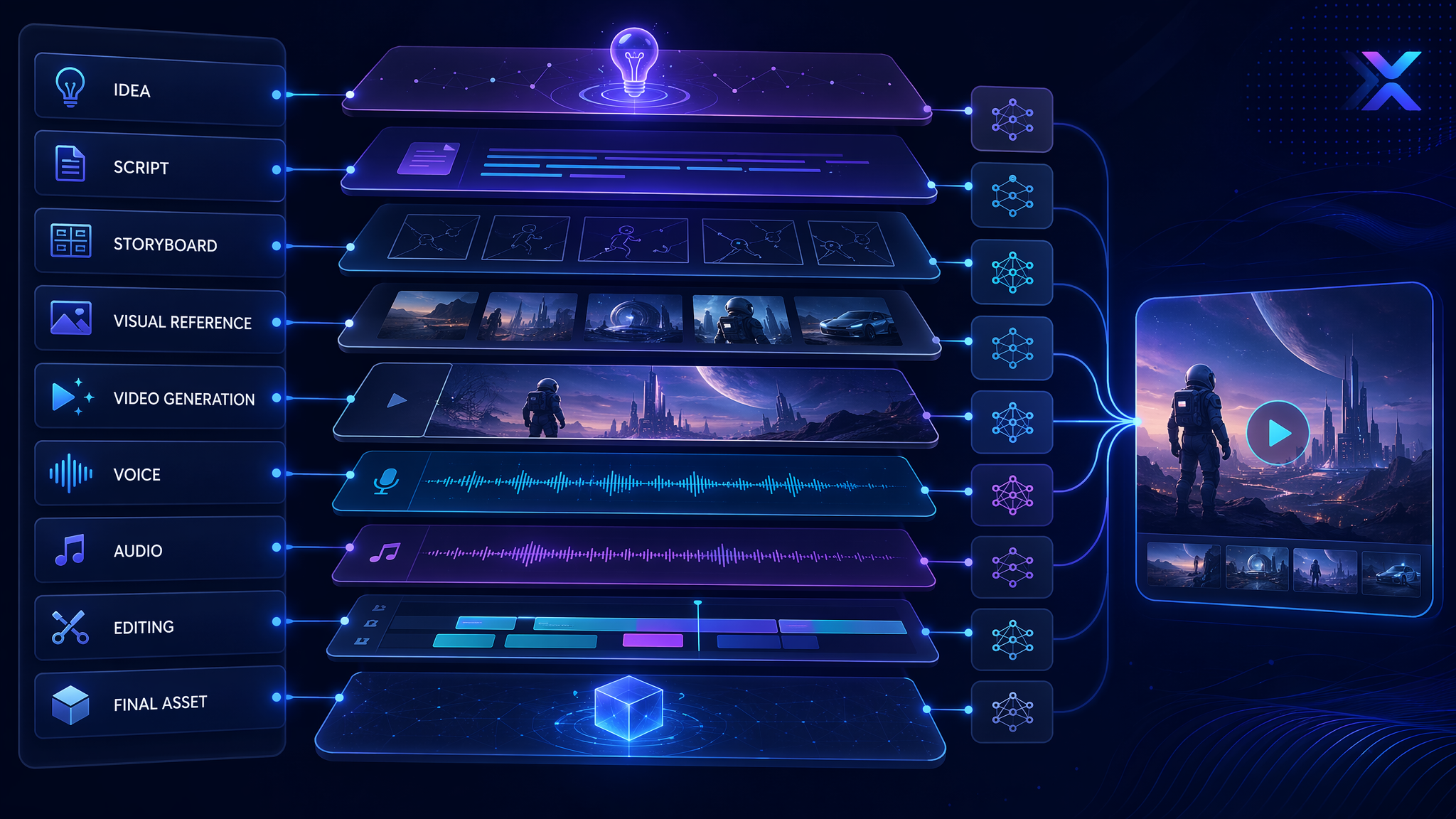
Idea → Script → Storyboard → Visual Reference → AI Video Generation → Voice & Audio → Review → Reusable Workflow → Final Asset
The first stage is the idea. This is where Gemini 3.1 Pro can be useful. Because it is designed for complex tasks and advanced reasoning, it can help creators turn a loose idea into a structured creative direction. For example, instead of writing 鈥渕ake an ad for a skincare product, - a team can use Gemini 3.1 Pro to define the target audience, product emotion, visual metaphor, scene sequence, platform format, and campaign message.
A better creative brief might look like this:
鈥淐reate a premium 15-second vertical video for a hydration skincare product. The target audience is young professionals who want a clean, effortless routine. The mood should feel calm, fresh, and high-end. The story should show dryness transforming into hydration through visual metaphors of light, water, and glass. - /p>
That brief then becomes a storyboard. Gemini 3.1 Pro can help break the concept into scenes:
Scene 1: Close-up of dry glass texture with soft morning light. Scene 2: Product appears on a reflective surface with water movement. Scene 3: Macro shot of the bottle as light passes through it. Scene 4: Final hero shot with clean visual space for copy.
The next stage is visual reference. This is where GPT Image 2 becomes valuable. Before moving into AI video generation, creators can use GPT Image 2 to generate or edit images that define the look of the scene. This might include a hero product frame, a character reference, a background environment, a cinematic lighting study, or a brand moodboard. For visual storytelling, a strong reference image can dramatically improve direction. It gives the AI video maker something more concrete than abstract text.
For example, a creator might generate a still image of 鈥渁 glass skincare bottle on a black stone surface with soft water reflections, warm backlight, and minimal luxury styling. - That image becomes a visual anchor for the video workflow.
The next stage is motion. Once the concept, storyboard, and visual references are ready, the creator can use an AI video generator inside a broader AI video creation platform like Pixmax.ai. The video prompt should describe subject, action, scene, camera, style, motion, rhythm, and format.
A strong video prompt might be:
鈥淐reate a 6-second premium skincare product video based on the reference image. The camera slowly pushes in toward the glass bottle. Soft water reflections move across the black stone surface. The lighting feels warm, clean, and cinematic. Motion should be smooth, stable, and elegant. Keep the product shape clear and consistent. - /p>
After video generation comes voice and audio. This is where Eleven v3 fits naturally. For a product ad, Eleven v3 can provide a polished voiceover. For AI comic dramas or live-action short dramas, it can support emotional delivery and multi-speaker dialogue. For global campaigns, its multilingual voice capability helps creators adapt content for different markets without rebuilding the entire video from scratch.
A voice direction could be:
鈥淲arm, calm, premium female voice. Slightly intimate tone. Slow pace. Soft emotional confidence. - /p>
For a short drama, the direction might be:
鈥淭wo speakers: one nervous and quiet, one confident and direct. The dialogue should feel cinematic, restrained, and emotionally tense. - /p>
The final stage is iteration. This is where Pixmax.ai matters most. A good creative team does not stop after one generation. They compare versions, adjust prompts, refine visuals, test voice tones, save what works, and build reusable workflows. A prompt pattern that works for one product showcase can become a template for ten more. A character workflow that works for one AI comic drama scene can become the foundation for a full series.
That is the difference between using AI as a toy and using AI as creative infrastructure.
Use Cases for GPT Image 2, Gemini 3.1 Pro, Eleven v3, and Pixmax.ai
For social media video content, the model stack helps teams move fast. Gemini 3.1 Pro can create hook ideas and platform-specific scripts. GPT Image 2 can generate scroll-stopping visual references. Pixmax.ai can turn those references into AI video generation workflows. Eleven v3 can add voiceovers, reactions, or character narration for TikTok, Instagram Reels, YouTube Shorts, and X.
For e-commerce advertising videos, the stack supports clarity and variation. Gemini 3.1 Pro can define the selling angle. GPT Image 2 can create clean product visuals and edited backgrounds. Pixmax.ai can generate product showcases and ad variations. Eleven v3 can create polished narration for different customer segments or markets.
For AI comic drama production, the stack helps maintain story structure. Gemini 3.1 Pro can build episode outlines, character arcs, and scene beats. GPT Image 2 can generate character designs and scene references. Pixmax.ai can support video generation and reusable workflows. Eleven v3 can bring emotional voice performance and multi-speaker control to dialogue scenes.
For virtual human marketing, the stack is especially powerful. Gemini 3.1 Pro can shape the brand personality and content calendar. GPT Image 2 can help design the visual identity of the virtual human. Pixmax.ai can support video creation and visual production. Eleven v3 can give the character a voice, tone, and emotional range.
For cinematic storytelling, the stack gives creators a faster path from imagination to execution. A director, creator, or studio can plan the story, design the look, generate motion, add voice, and refine the output inside a connected workflow.
The Future of AI Video Creation Platforms: From Model Access to Model Orchestration
The next phase of AI video generation will not be defined only by better models. Better models are coming, and they will make a huge difference. GPT Image 2 will push image quality and editing forward. Gemini 3.1 Pro will make planning and reasoning more useful. Eleven v3 will make AI voices more expressive and globally adaptable. Video generation models will keep improving motion, consistency, physics, camera control, and scene continuity.
But the bigger product shift is orchestration.
Creators do not want to manage a chaotic chain of disconnected tools forever. They want a workspace where ideas, prompts, images, video clips, voice, references, teams, and final assets can live together. They want to save what works. They want to reuse creative systems. They want to move faster without losing taste.
That is the long-term direction of Pixmax.ai. We are building an AI video creation platform where creators, marketers, studios, and enterprise teams can access leading AI models, build reusable workflows, collaborate across projects, and create professional visual content at scale.
The future AI video maker will not simply generate clips. It will help teams think, design, produce, revise, and distribute. It will feel less like a slot machine and more like a creative operating system.
That is the model stack we believe in: not one model replacing the creative process, but many models working together to make the creative process faster, richer, and more scalable.
Build Your AI Video Model Stack with Pixmax.ai
Pixmax.ai helps creators and teams turn ideas, prompts, images, videos, and voices into cinematic visual content through a connected AI creative workspace.
Explore Pixmax AI - Discover the product and start your creative journey.
Join our Discord - Meet the community and share insights with other AI creators.
Follow us on social media — Stay updated with new features, model releases, workflow ideas, and creative highlights.
Read more
Browse All
Create with Pixmax
Streamline your entire creative workflow with Pixmax, the all-in-one AI video creation platform built for maximum efficiency.